Consider an example:
- Suppose we want to store the following data in a patient
database: patient-name, age, height, weight, blood-type
- This might be a sample set of data records:
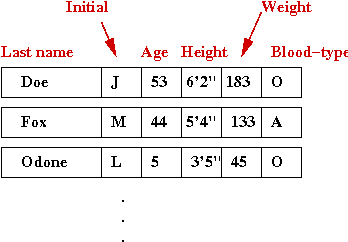
- What we'd like to do is associate a key with each record
=>
Usually, this is what we'd use to search for the record.
- Let's use name as the key:

- The name becomes the key, while the entire record
becomes the associated value
=>
A map is a data structure that stores name-value associations.
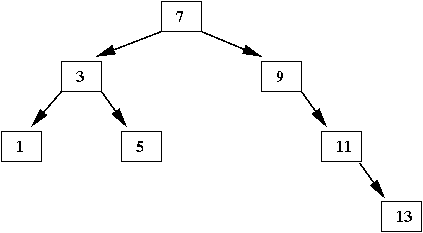
An example with trees:
- Suppose we wish to store the following associations:

- In a program, this is how we'd like to make the
associations:
(source file)
public class BinaryTreeMapExample {

    public static void main (String[] argv)
    {
        // Create an instance of the map data structure.
        BinaryTreeMap tree = new BinaryTreeMap ();

        // Add name and fierceness-rating (1-10)
        tree.add ("Ewok", 3);
        tree.add ("Aqualish", 6);
        tree.add ("Gungan", 2);
        tree.add ("Amanin", 8);
        tree.add ("Jawa", 6);
        tree.add ("Hutt", 7);
        tree.add ("Cerean", 4);

        int rating = tree.getValue ("Hutt");
        System.out.println ("Rating for Hutt: " + rating);
    }

}
Let's examine the code for BinaryTreeMap:
(source file)
import java.util.*;

class TreeNode {

    String key;        // The key-value pair.
    int value;

    TreeNode left;     // The usual left-child, right-child pointers.
    TreeNode right;

}


public class BinaryTreeMap {

    TreeNode root = null;
    int numItems = 0;


    public void add (String key, int value)
    {
        // If empty, create new root.
        if (root == null) {
            root = new TreeNode ();
            // Store both key and value:
            root.key = key;
            root.value = value;
            numItems ++;
            return;
        }

        // Search to see if it's already there.
        if ( contains (key) ) {
            // Handle duplicates.
            return;
        }

        // If this is a new piece of data, insert into tree.
        recursiveInsert (root, key, value);

        numItems ++;
    }


    void recursiveInsert (TreeNode node, String key, int value)
    {
        // Compare input key with key in current node: comparisons are only with keys.

        if ( key.compareTo (node.key) < 0 ) {
            // It's less. Go left if possible, otherwise we've found the correct place to insert.
            if (node.left != null) {
                recursiveInsert (node.left, key, value);
            }
            else {
                node.left = new TreeNode ();
                node.left.key = key;              // Store both key and value.
                node.left.value = value;
            }

        }
        // Otherwise, go right.
        else {
            // It's greater. Go right if possible, otherwise we've found the correct place to insert.
            if (node.right != null) {
                recursiveInsert (node.right, key, value);
            }
            else {
                node.right = new TreeNode ();
                node.right.key = key;             // Store both key and value.
                node.right.value = value;
            }
        }


    }


    public int size ()
    {
        return numItems;
    }


    public boolean contains (String str)
    {
        if (numItems == 0) {
            return false;
        }

        TreeNode node = recursiveSearch (root, str);
        if (node == null) {
            return false;
        }

        return true;
    }


    public int getValue (String key)
    {
        if (numItems == 0) {
            return -1;
        }

        TreeNode node = recursiveSearch (root, key);
        if (node == null) {
            return -1;
        }

        return node.value;
    }


    TreeNode recursiveSearch (TreeNode node, String key)
    {
        // If input key is at current node, it's in the tree.
        if ( key.compareTo (node.key) == 0 ) {
            // Found.
            return node;
        }

        // Otherwise, navigate further.
        if ( key.compareTo (node.key) < 0 ) {
            // Go left if possible, otherwise it's not in the tree.
            if (node.left == null) {
                return null;
            }
            else {
                return recursiveSearch (node.left, key);
            }
        }
        else {
            // Go right if possible, otherwise it's not in the tree.
            if (node.right == null) {
                return null;
            }
            else {
                return recursiveSearch (node.right, key);
            }
        }
    }

} //end-BinaryTreeMap
Note:
- We store both the key and its associated value at the time of
adding a key.
- The organization of the tree depends on the keys
=>
Values play no role in searching or tree organization.
=>
They are merely stored along with the associated keys.
- In the above example, each key is a String and each
value is an int.
Sometimes we wish to store a more complex value
=>
An object, for instance.
- For example, suppose we wanted to store these associations:

- We will use an object called TribeInfo to store the
three pieces of information:
class TribeInfo {

    String name;
    int fierceness;
    String planet;


    // Constructor.

    public TribeInfo (String name, int fierceness, String planet)
    {
        this.name = name;
        this.fierceness = fierceness;
        this.planet = planet;
    }

}
- Then, we'd like to create key-value associations between
tribe names and the associated object as follows:
(source file)
public class BinaryTreeMapExample2 {

    public static void main (String[] argv)
    {
        // Create an instance of our new object-version of a binary-tree map.
        BinaryTreeMap2 tree = new BinaryTreeMap2 ();

        // Put some key-value pairs inside.
        TribeInfo info = new TribeInfo ("Ewok", 3, "Endor");
        tree.add ("Ewok", info);

        info = new TribeInfo ("Aqualish", 6, "Ando");
        tree.add (info.name, info);

        info = new TribeInfo ("Gungan", 2, "Naboo");
        tree.add (info.name, info);

        info = new TribeInfo ("Amanin", 8, "Maridun");
        tree.add (info.name, info);

        info = new TribeInfo ("Jawa", 6, "Tatooine");
        tree.add (info.name, info);

        info = new TribeInfo ("Hutt", 7, "Varl");
        tree.add (info.name, info);

        info = new TribeInfo ("Cerean", 4, "Cerea");
        tree.add (info.name, info);

        // Note: a cast is needed for conversion from Object to TribeInfo
        // even though we know that a TribeInfo instance will be returned.
        TribeInfo tInfo = (TribeInfo) tree.getValue ("Hutt");
        System.out.println ("Info for Hutt: " + tInfo);
    }

}
Let's now take a look at implementing the map:
(source file)
import java.util.*;

class TreeNode {

    String key;
    Object value;      // The value is now a generic object.

    TreeNode left;
    TreeNode right;

}


public class BinaryTreeMap2 {

    TreeNode root = null;
    int numItems = 0;


    public void add (String key, Object value)
    {
        // ...
    }


    public int size ()
    {
        // ...
    }


    public boolean contains (String key)
    {
        // ...
    }


    public Object getValue (String key)
    {
        // ...

        // Return value is an Object (the value)
    }

}
Note:
- The code changes only slightly
=>
The value is now of type Object.
What is an Object?
- This is a special class in the Java library, and is
treated differently by the compiler.
- Every Java object is also an Object.
- Here's an example that explores the connection between
Object and any other class we define:
(source file)
class MyOwnVeryObject {         // A silly little object

    int k;

    public String toString ()
    {
        return ("k=" + k);
    }

}


public class TestObject {

    public static void main (String[] argv)
    {
        // Create an instance of the class defined above and set a value for one of the members.
        MyOwnObject x = new MyOwnObject ();
        x.k = 5;

        // Invoke the toString() method:
        System.out.println (x);

        // Since MyOwnObject is also an Object, an Object variable can point to it.
        Object obj = x;

        // Invoke the toString() method: this calls the toString() method in x.
        System.out.println (obj);

        // Cast down from an Object variable into a MyOwnObject variable.
        MyOwnObject y = (MyOwnObject) obj;
        print (y);

        // Casting can occur in a method call too.
        print (x);
    }


    static void print (Object obj)
    {
        System.out.println (obj);
    }

}
- This is why we needed the cast when we extracted
the value in the map example:
        // Cast from return type (Object) into tInfo's type (TribeInfo).
        TribeInfo tInfo = (TribeInfo) tree.getValue ("Hutt");
A separate key-value pair object
An alternative to handling keys and values separately is to
create a single object that packages key-and-value:
- For example:
(source file)
public class KeyValuePair {

    String key;
    Object value;

    public KeyValuePair (String s, Object v)
    {
        key = s;
        value = v;
    }

}
- Then, our map data structure is written to work with such
objects:
(source file)
import java.util.*;

class TreeNode {

    KeyValuePair kvp;      // A tree node now stores the Key-Value pair as an object.

    TreeNode left;         // The usual pointers.
    TreeNode right;

}


public class BinaryTreeMap3 {

    public void add (KeyValuePair kvp)
    {
        // ...
    }

    public boolean contains (String key)
    {
        // ...
    }

    public KeyValuePair getKeyValuePair (String key)
    {
        // ...
    }

}
Let's re-work our earlier map example to use
KeyValuePair's:
(source file)
class TribeInfo {

    String name;
    int fierceness;
    String planet;

    public TribeInfo (String name, int fierceness, String planet)
    {
        this.name = name;
        this.fierceness = fierceness;
        this.planet = planet;
    }

} //end-TribeInfo


public class BinaryTreeMapExample3 {

    public static void main (String[] argv)
    {
        // Create an instance.
        BinaryTreeMap3 tree = new BinaryTreeMap3 ();

        // Put some key-value pairs inside.
        TribeInfo info = new TribeInfo ("Ewok", 3, "Endor");
        KeyValuePair kvp = new KeyValuePair ("Ewok", info);
        tree.add (kvp);

        info = new TribeInfo ("Aqualish", 6, "Ando");
        kvp = new KeyValuePair (info.name, info);
        tree.add (kvp);

        // This is more compact: create the instance in the method argument list.
        info = new TribeInfo ("Gungan", 2, "Naboo");
        tree.add ( new KeyValuePair (info.name, info) );

        info = new TribeInfo ("Amanin", 8, "Maridun");
        tree.add ( new KeyValuePair (info.name, info) );

        info = new TribeInfo ("Jawa", 6, "Tatooine");
        tree.add ( new KeyValuePair (info.name, info) );

        info = new TribeInfo ("Hutt", 7, "Varl");
        tree.add ( new KeyValuePair (info.name, info) );

        // A little harder to read, but even more compact:
        tree.add ( new KeyValuePair ("Cerean", new TribeInfo ("Cerean", 4, "Cerea") ) );

        KeyValuePair kvpResult = tree.getKeyValuePair ("Hutt");
        System.out.println ("Info for Hutt: " + kvpResult);
    }

}
A linked-list map
A map can also be implemented with a linked list:
- The method signatures for the linked list would now look like this:
public class OurLinkedListMap {

    public void add (KeyValuePair kvp)
    {
        // ...
    }

    public boolean contains (String key)
    {
        // ...
    }

    public KeyValuePair getKeyValuePair (String key)
    {
        // ...
    }

}
- Let's look at the code in contains(), for example:
(source file)
    public boolean contains (String key)
    {
	if (front == null) {
	    return false;
	}

        // Start from the front and walk down the list. If it's there,
        // we'll be able to return true from inside the loop.
	ListItem listPtr = front;
	while (listPtr != null) {
            // Note: listPtr.kvp is the KeyValuePair instance.
	    if ( listPtr.kvp.key.equals(key) ) {
		return true;
	    }
	    listPtr = listPtr.next;
	}
	return false;
    }
Hashtables
Key ideas:
- Sometimes the shorter term hashing is also used.
- There are many varieties of hashtables
=>
We will study one of the simplest: an array of linked-lists.
- Suppose we want to store the numbers: 4, 7, 8, 10, 11, 14,
23, 32, 46, 51.
- In a list, it would look like this:

- Suppose we instead store the 10 elements in 5 lists as follows:
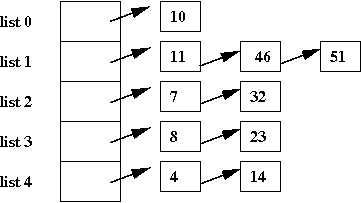
- In this case, most of the lists are small (size 1 or 2).
- If we wanted to search for '23', we'd go to list 3 and look
for it.
=>
Since the list is smaller, the search time is less than a
full-list search.
- But: how do we know which list '23' is in?
More details:
- The collection of lists is implemented as an array of lists.
=>
Thus, list 3 is really the 4-th position in the array of lists.
- Given an element K, we want a function f(K) to tell
us which list it should belong to.
=>
This is used in both insertion and search.
- Terminology: the function f() is called a hash function.
- Terminology: in the hashing jargon, a list is called a bucket.
- To insert an element K:
- Compute f(K).
- Insert K in list# f(K).
- To search for an element K:
- Compute f(K).
- Do a regular list-search in list# f(K).
- Typically, the number of linked lists is large:
- To store 1000 elements, we'd use at least 1000 lists.
=>
1000 buckets.
- To store 108 elements, we'd probably use
something like 105 buckets.
- There's no fixed rule
=>
For fast access, the more buckets the better.
Storing strings:
- Can we design a hash function for strings?
- Thus, we'd want a function f() such that
we could compute f("Ewok").
- What should be output of f() be?
=>
f() should result in an integer between 0 and M-1, where
M is the number of lists.
- Let's try this:
f("Ewok") = sum of the ascii letters in the string
=>
But what if that exceeds M?
- Solution:
f("Ewok") = (sum of ascii letters in the string) mod M
=>
Any number mod M lies in the range 0,...,M-1.
- Real hash functions are similar.
- Java provides a hashCode() method in the class
String and in many other fundamental classes as well.
Let's look at pseudocode:
- Pseudocode for insertion:
Algorithm: insert (key, value)
Input: key-value pair
     // Compute table entry:
1.   entry = key.hashCode() mod numBuckets
2.   if table[entry] is null
       // No list present, so create one
3.     table[entry] = new linked list;
4.     table[entry].add (key, value)
5.   else
6.     // Otherwise, add to existing list
7.     table[entry].add (key, value)
8.   endif
- Similarly, for search:
Algorithm: search (key)
Input: search-key
     // Compute table entry:
1.   entry = key.hashCode() mod numBuckets
2.   if table[entry] is null
3.     return null
4.   else
5.     return table[entry].search (key)
6.   endif
Finally, our implementation in Java:
(source file)
public class OurHashMap {

    int numBuckets = 100;              // Initial number of buckets.
    OurLinkedListMap[] table;          // The hashtable.
    int numItems;                      // Keep track of number of items added.


    // Constructor.

    public OurHashMap (int numBuckets)
    {
        this.numBuckets = numBuckets;
        table = new OurLinkedListMap [numBuckets];
        numItems = 0;
    }


    public void add (KeyValuePair kvp)
    {
        if ( contains (kvp.key) ) {
            return;
        }

        // Compute hashcode and therefore, which table entry (list).
        int entry = Math.abs(kvp.key.hashCode()) % numBuckets;

        // If there's no list there, make one.
        if (table[entry] == null) {
            table[entry] = new OurLinkedListMap ();
        }

        // Add to list.
        table[entry].add (kvp);

        numItems ++;
    }


    public boolean contains (String key)
    {
        // Compute table entry using hash function.
        int entry = Math.abs(key.hashCode()) % numBuckets;

        if (table[entry] == null) {
            return false;
        }

        // Use the contains() method of the list.
        return table[entry].contains (key);
    }


    public KeyValuePair getKeyValuePair (String key)
    {
        // Similar to contains.
        int entry = Math.abs(key.hashCode()) % numBuckets;
        if (table[entry] == null) {
            return null;
        }
        return table[entry].getKeyValuePair (key);
    }

}
Analysis:
- If each bucket has only a few elements
=>
Fixed (smaller) number of items in each list.
=>
O(1) time to search/insert in a list.
- Next, suppose we assume that the hash function itself takes
very little time (O(1)) to compute.
=>
Then, it takes O(1) time to insert or search in a hashtable
=>
Optimal!
- Thus, let's add hashing to our comparison so far:
| Data structure | Insertion | Search |
| LinkedList | O(1) | O(n) |
| ArrayList | O(n)? | O(n) |
| SortedList | O(n) | O(log(n)) |
BinaryTree
(balanced) | O(log(n)) | O(log(n)) |
| Hashtable | O(1) | O(1) |
Caveats:
- The performance depends on the lists being very small
=>
This may not happen for very large number of elements
- For large data (large n) and M buckets, we can
expect n/M elements per list.
=>
Search/insertion time will take at least n/M.
- We also need the hash function to spread the data uniformly
across the buckets
=>
Need a good hash function, and some luck (with the data)
What we haven't covered in hashing:
- There are many varieties of hash tables.
- You can create hash-trees (trees of hashtables, with a
different hash function used at each node).
- One can build hash functions based on data to ensure uniform spread.