Let's review what we know about objects so far:
public class StaticExample {

    static double x;                      // Static data

    static void printx ()                 // Static method
    {
        System.out.println ("x = " + x);
    }

    public static void main (String[] argv)
    {
        x = 5.34;
        printx ();
    }

}
// A simple static object. Note: all members (data and methods) are declared
// with the "static" keyword.

class ObjX {

    static int i;

    static void print ()
    {
	System.out.println ("i=" + i);
    }

} //end-ObjX


// The class that has "main"

public class StaticExample {

    public static void main (String[] argv)
    {
        // Refer to a member of ObjX using the class name.
	ObjX.i = 5;

        // Call a method in the class using the class name and dot-operator.
	ObjX.print();
    }

}
Note:
        // Refer to a member of ObjX using the class name.
	ObjX.i = 5;

        // Call a method in the class using the class name and dot-operator.
	ObjX.print();
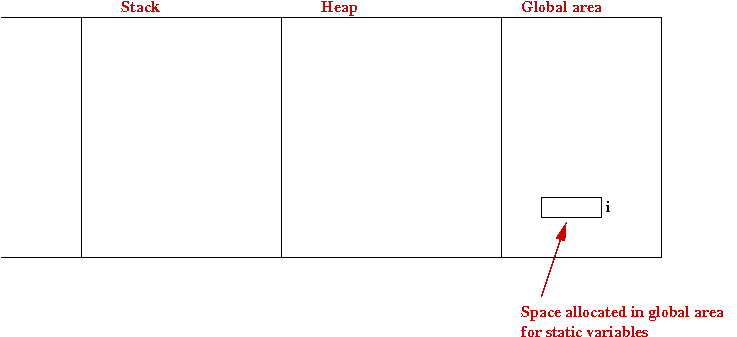
Let's now examine the "memory picture" for a static object:
More about encapsulation:
Let's look at an example with a dynamic object:
(source file)
In-Class Exercise 5.1:
Download DynamicExample.java
and add a second data member (say, another int) to the
class ObjX. Then, in main, assign a value
to the new variable and print it.
Next, we'll make a small modification:
(source file)
We'll now examine what memory looks like
In-Class Exercise 5.2:
Go back to the first example,
DynamicExample.java,
and draw the memory pictures for this example at various
points in the execution of main().
A few words about nomenclature:
// Dynamic object definition

class ObjX {

    // No "static" keyword for either member.

    int i;

    void print ()
    {
	System.out.println ("i=" + i);
    }

}


public class DynamicExample {

    public static void main (String[] argv)
    {
        // First create an instance, which allocates space from the heap.
	ObjX x = new ObjX ();

        // Now access members via the variable and the dot-operator.
	x.i = 5;
	x.print();
    }

}
Note:
=>
All members are dynamic.
ObjX x = new ObjX ();
class ObjX {

    // No "static" keyword for either member.

    int i;

    void print ()
    {
	System.out.println ("i=" + i);
    }

}


public class DynamicExample2 {

    // A simple variable declaration.
    static ObjX x;


    public static void main (String[] argv)
    {
        // First create an instance, which allocates space from the heap.
	x = new ObjX ();

        // Now access members via the variable and the dot-operator.
	x.i = 5;
	x.print();
    }

}
Note:
    // A simple variable declaration.
    static ObjX x;
x = new ObjX ();
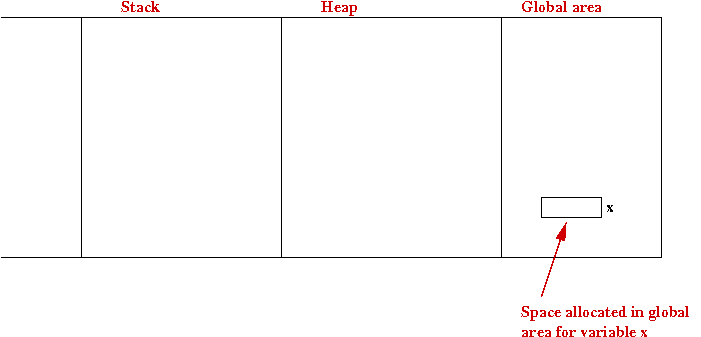
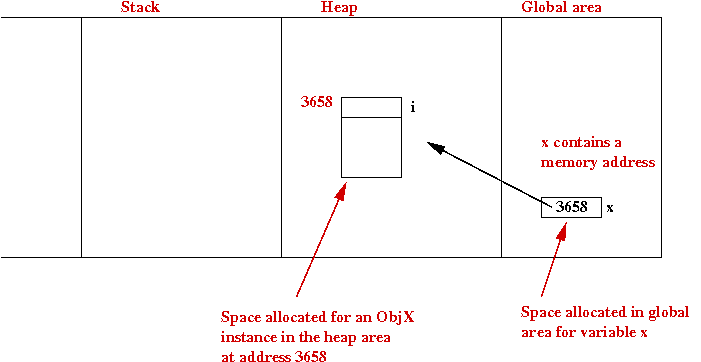
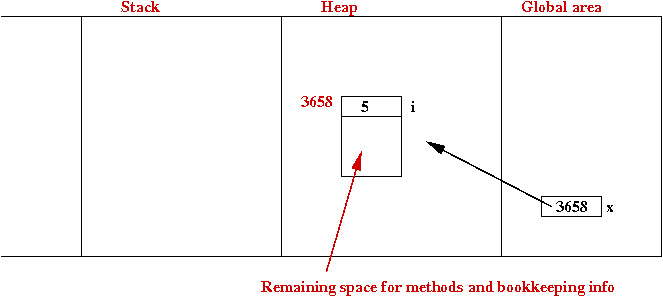
Consider this example:
(source file)
In-Class Exercise 5.3:
Consider the example below and draw the memory picture
just after the execution of x2.i=6:
(source file)
An example with an array of objects:
(source file)
In-Class Exercise 5.4:
Consider the example below and draw the memory picture
just after the execution of x2.i=6:
Object instances can be passed as parameters to methods
and can be returned from methods:
(source file)
In-Class Exercise 5.5:
What is the memory picture just after executing the only
line in printTheObject(), but before the method
returns?
In-Class Exercise 5.6:
Download DynamicExample8.java
and draw the memory picture just after the last statement in main().
class ObjX {

    int i;

    void print ()
    {
	System.out.println ("i=" + i);
    }

} //end-ObjX


public class DynamicExample3 {

    public static void main (String[] argv)
    {
        // Create an instance and do stuff with it.
	ObjX x = new ObjX ();
	x.i = 5;
	x.print();

        // Create another instance assigned to the same variable.
        x = new ObjX ();
        x.i = 6;
        x.print();
    }

}
Note:
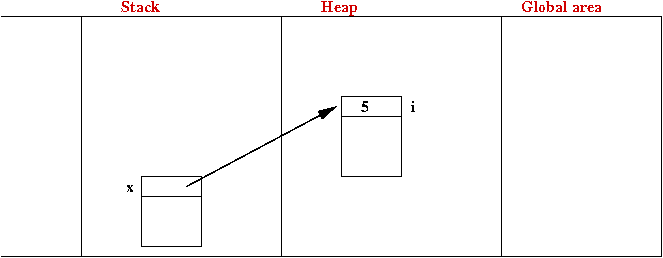
        // Create another instance assigned to the same variable.
        x = new ObjX ();
        x.i = 6;
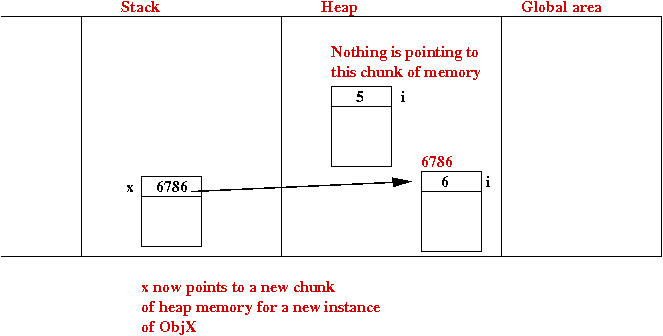
=>
It gets garbage-collected.
=>
Puts the memory back into the "available pool" of heap memory.
class ObjX {

    // ... same as before

}

public class DynamicExample4 {

    public static void main (String[] argv)
    {
        // Create an instance and do stuff with it.
	ObjX x = new ObjX ();
	x.i = 5;
	x.print();

        // Create another instance assigned to the same variable.
        ObjX x2 = new ObjX ();
        x2.i = 6;
        x2.print();
    }

}
class ObjX {

    int i;

    void print ()
    {
	System.out.println ("i=" + i);
    }

} //end-ObjX


public class DynamicExample5 {

    public static void main (String[] argv)
    {
        // Make space for 4 ObjX pointers.
        ObjX[] xArray = new ObjX [4];

        // Make each of the 4 pointers point to ObjX instances.
        for (int k=0; k < 4; k++) {
            xArray[k] = new ObjX ();
        }

        // Now assign data to some of them.
        xArray[0].i = 5;
        xArray[1].i = 6;

        // Print all.
        for (int k=0; k < 4; k++) {
            xArray[k].print();
        }

    }

}
Note:
ObjX[] xArray = new ObjX [4];
        ObjX[] xArray;
        xArray = new ObjX [4];
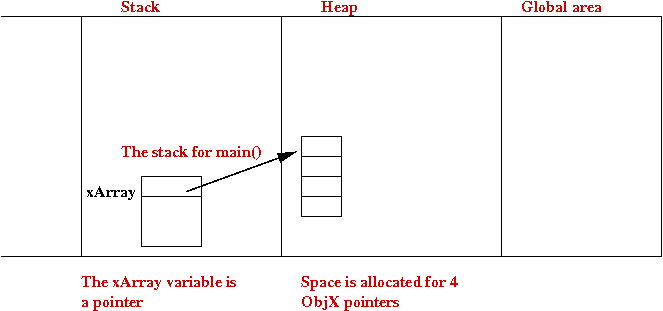
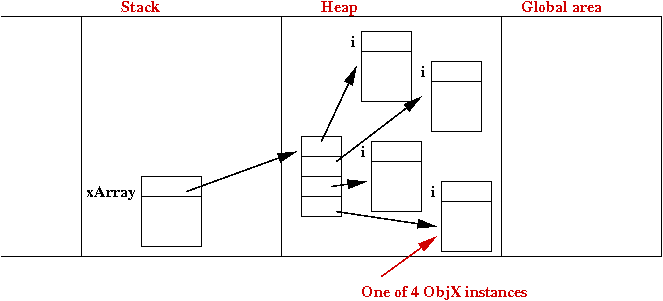
        // Make each of the 4 pointers point to ObjX instances.
        for (int k=0; k < 4; k++) {
            xArray[k] = new ObjX ();
        }
The memory picture after this is:
        // Now assign data to some of them.
        xArray[0].i = 5;
        xArray[1].i = 6;
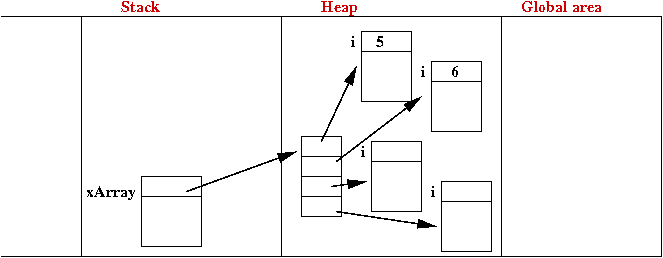
class ObjX {

    // ... same ...

}


public class DynamicExample6 {

    public static void main (String[] argv)
    {
	ObjX x = new ObjX ();
	x.i = 5;

        // Assignment between object variables.
        ObjX x2 = x;
        x2.i = 6;

	x.print();
        x2.print();
    }

}
What gets printed out?
class ObjX {

    // ... same ...

} //end-ObjX


public class DynamicExample7 {

    public static void main (String[] argv)
    {
        // Call a method that returns an instance of ObjX.
        ObjX x = makeAnObject();

        // Pass the instance as parameter to a method.
        printTheObject (x);
    }


    // Note: return type is ObjX

    static ObjX makeAnObject ()
    {
	ObjX obj = new ObjX ();
	obj.i = 5;
        return obj;
    }


    // Note: parameter type is ObjX

    static void printTheObject (ObjX obj)
    {
        obj.print();
    }

}
Note:
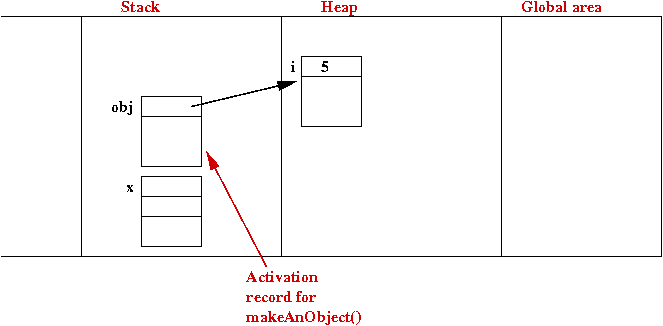
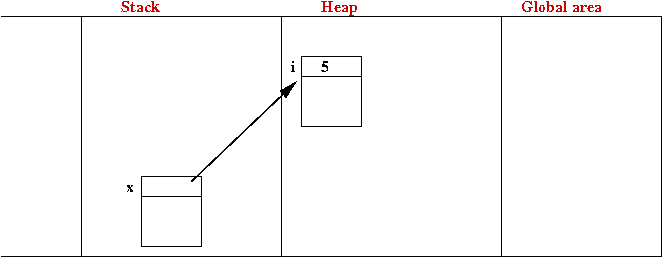
Consider this example:
(source file)
In-Class Exercise 5.7:
Draw the memory picture after the last line executes in main().
Now for an interesting variation:
(source file)
In-Class Exercise 5.8:
Draw the memory picture after the last line executes in main().
class ObjX {

    int i;

    ObjY y;

}


class ObjY {

    String name;

}


public class DynamicExample9 {

    public static void main (String[] argv)
    {
        // Make an ObjX instance.
        ObjX x = new ObjX ();
        x.i = 5;

        // The y instance variable in x is assigned an instance of ObjY
        x.y = new ObjY ();

        // Note the repeated use of the dot-operator.
        x.y.name = "Mr. Y";
    }

}
Note:

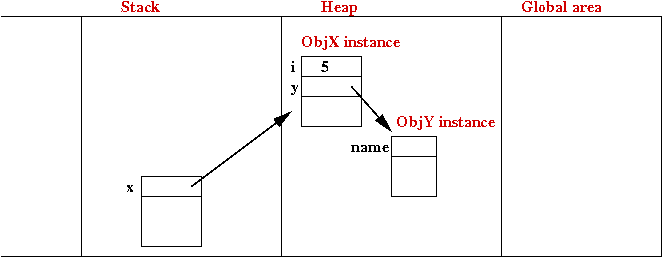
class ObjX {

    int i;

    // A variable of the same type:
    ObjX anotherX;

}


public class DynamicExample10 {

    public static void main (String[] argv)
    {
        // Make an ObjX instance.
        ObjX x = new ObjX ();
        x.i = 5;

        // Make the anotherX variable point to a new ObjX instance.
        x.anotherX = new ObjX ();
        x.anotherX.i = 6;
    }

}
The method toString(), if written for any object as shown below, has
a special use in Java:
(source file)
In-Class Exercise 5.9:
Download the above
program and remove the toString() method from
ObjX. Then compile and run. What do you see?
class ObjX {

    int i;

    public String toString ()
    {
        String s = "i=" + i;
        return s;
    }

}


public class DynamicExample11 {

    public static void main (String[] argv)
    {
        // Make an ObjX instance and assign something to its variable i.
        ObjX x = new ObjX ();
        x.i = 5;

        // Note how "x" is directly given to println()
        System.out.println (x);

        // Another use:
        String outputStr = "Object x: " + x;
        System.out.println (outputStr);
    }

}
Note:
    public String toString ()
    {
    }
String outputStr = "Object x: " + x;
As an object designer, you may want allow users (other programmers) to access and modify (mutate) data in your object.
The wrong way to do this is to make all data public:
class Customer {

  public String custName;
  public int bankBalance;

}

// Later somewhere ....

  Customer c = new Customer ();
  c.bankBalance = -1000;       // Don't want to allow this.
  c.custName = "331-77-9910"   // Oops.
Instead, it's best to allow access only via methods:
class Customer {

  // Internal data.
  private String custName;
  private int bankBalance;

  // Accessors.
  public String getCustName ()
  {
    return custName;
  }
  public int getBankBalance ()
  {
    return bankBalance;
  }

  // Mutators.
  public void setBankBalance (int newBalance)
  {
    if (newBalance >= 0)
      bankBalance = newBalance;
    else {
      // ... handle error.
    }
  }
  public void setCustName (String newName)
  {
    //... perform extensive checking.
  }

} // End of class "Customer"

// Later somewhere ....

  Customer c = new Customer ();
  c.bankBalance = -1000;       // Won't compile.
  c.custName = "331-77-9910"   // Won't compile.
Note:
class Customer {

  // ... etc

  public void setBankBalance (int newBalance)
  {
    if (newBalance >= 0)
      bankBalance = newBalance;
    else {
      // ... handle error.
    }
  }

}
class MasterList {
  Customer[] custList;

  // Accessor.
  public Customer getCustomer (int i)
  {
    return custList[i];
  }
}

//... later somewhere...
  MasterList ml;
  //... more stuff...
  Customer c = ml.getCustomer (9);

  // This is OK.- the real purpose is to
  // get the name.
  System.out.println (c.getCustName());

  // This is not what we had in mind.
  c.setBankBalance (0);
In this case, it's probably better to return just a name:
class MasterList {
  Customer[] custList;

  // Accessor.
  public String getCustName (int i)
  {
    return custList[i].getCustName();
  }
}
double sqrtOf2 = Math.sqrt (2);
Part-II. Declare the two variables inside your class Complex as static. Does it work? Explain.
Recall how we create object instances with the new operator:
Before we answer that question, we will enhance our ObjX
example and add a few so-called constructors:
(source file)
First, let's fix the compilation problem by removing the "old
way":
(source file)
So, now let's get back to some nagging questions:
Answers:
        // Make an ObjX instance.
        ObjX x = new ObjX ();
You might wonder why there are parentheses at the end.
class ObjX {

    int i;

    String name;


    // This is the first constructor: only takes in one parameter for the name.

    public ObjX (String initialName)
    {
        name = initialName;
        i = 0;
    }


    // This is the second constructor: both name and ID are initialized.

    public ObjX (String initialName, int ID)
    {
        name = initialName;
        i = ID;
    }


    public String toString ()
    {
        return "My name is " + name + " and my ID number is " + i;
    }

}


public class DynamicExample12 {

    public static void main (String[] argv)
    {
        // The old way: without using constructors. Will not compile
        ObjX x = new ObjX ();
        x.i = 5;
        x.name = "Mr. X";
        System.out.println (x);


        // This compiles fine:

        // Use the first constructor.
        x = new ObjX ("Mr. X");
        System.out.println (x);

        // Use the second one.
        x = new ObjX ("Mr. X", 5);
        System.out.println (x);
    }

}
class ObjX {

    int i;

    String name;


    // This is the first constructor: only takes in one parameter for the name.

    public ObjX (String initialName)
    {
        name = initialName;
        i = 0;
    }


    // This is the second constructor: both name and ID are initialized.

    public ObjX (String initialName, int ID)
    {
        name = initialName;
        i = ID;
    }


    public String toString ()
    {
        return "My name is " + name + " and my ID number is " + i;
    }

}


public class DynamicExample13 {

    public static void main (String[] argv)
    {
        // Use the first constructor.
        ObjX x = new ObjX ("Mr. X");
        System.out.println (x);

        // Use the second one.
        x = new ObjX ("Mr. X", 5);
        System.out.println (x);
    }

}
Note:
ObjX x = new ObjX ("Mr. X");
the first (one-parameter) constructor executes.
x = new ObjX ("Mr. X", 5);
the second constructor (with two parameters) executes.
          ObjX x = new ObjX ("Mr. X");
          x.ObjX ("Mr. Y");                 // Will not compile.
        // Use the first constructor.
        ObjX x = new ObjX ("Mr. X");
        System.out.println (x);
=>
This is the "default no-parameter" constructor.
=>
This is why the parentheses are part of the syntax.
=>
It now becomes a compiler error to try and use one.
class ObjX {

    int i;

    String name;


    // This is the first constructor: only takes in one parameter for the name.

    public ObjX (String initialName)
    {
        name = initialName;
        i = 0;
    }


    // This is the second constructor: both name and ID are initialized.

    public ObjX (String initialName, int ID)
    {
        name = initialName;
        i = ID;
    }


    // No-parameter constructor that we added

    public ObjX ()
    {
        name = "X";   // Default name
        i = 0;        // Default value of i
    }


    public String toString ()
    {
        return "My name is " + name + " and my ID number is " + i;
    }

}


public class DynamicExample14 {

    public static void main (String[] argv)
    {
        // Use the no-parameter constructor.
        ObjX x = new ObjX ();
        x.i = 5;
        System.out.println (x);
    }

}
        ObjX x = new ObjX ();
        x.i = 5;
=>
The creator of the class shouldn't allow others to modify data
=>
Data should be declared private
class ObjX {

    private int i;

    private String name;


    // ... constructors, methods ... etc

}
        ObjX x = new ObjX ();
        x.i = 5;                    // Compiler error!
won't compile.
Consider the following example: we want to be able to compare customers using their balances: (source file)
class Customer {
  String custName;
  int bankBalance;

  public Customer (String cname, int balance)
  {
    // ...
  }

  public int getBalance ()
  {
    return bankBalance;
  }

  // ... other constructors/methods (not shown)

} //end-Customer

public class DynamicExample16 {

  static int compare (Customer c1, Customer c2)
  {
    int b1 = c1.getBalance();
    int b2 = c2.getBalance();

    // Some calculation with the balances.
    double ratio = (double) b1 / (double) b2;

    if ( (0.1 < ratio) && (ratio < 10) )
      return 0;
    else if (b1 < b2)
      return -1;
    else
      return 1;
  }

  public static void main (String[] argv)
  {
    Customer c1 = new Customer ("Bill G", 1000000);
    Customer c2 = new Customer ("Larry E", 100000);

    int comp = compare (c1, c2);
    if (comp < 0)
      System.out.println ("c2 is richer");
    else if (comp > 0)
      System.out.println ("c1 is richer");
    else
      System.out.println ("same balance");

  }

}
Note:
For encapsulation it is better to place comparison code inside the relevant object (inside Customer).
For example:
(source file)
There is something strange about using c1's
accessor functions from within c1
itself - it's inefficient! Instead, consider the following improvement:
(source file)
This would be the end of the story, except that
Java provides an interesting feature: When an object instance is passed as a parameter
to another instance of the same object, the first instance's variables
(even if private) are accessible from the second. Thus, the following is possible (and recommended):
( source file) Note:
In-class Exercise 5.11:
Embellish the Complex object in Exercise 5.10 with the following
features:
class Customer {

  //... stuff left out...

  // The comparion function -- now it's inside the class Customer.
  int compare (Customer c1, Customer c2)
  {
    int b1 = c1.getBalance();
    int b2 = c2.getBalance();

    //... as before ...

  }

} // End of class "Customer"


public class DynamicExample17 {

  public static void main (String[] argv)
  {
    Customer c1 = new Customer ("Bill G", 1000000);
    Customer c2 = new Customer ("Larry E", 100000);

    // Call the function compare in c1.
    int comp = c1.compare (c1, c2);

    if (comp < 0)
      System.out.println ("c2 is richer");
    else if (comp > 0)
      System.out.println ("c1 is richer");
    else
      System.out.println ("same balance");

  }

}
class Customer {

  String custName;
  int bankBalance;

  // ... stuff left out ...

  // New and improved comparison:
  public int compare (Customer c)
  {
    // bankBalance is part of THIS object.
    double ratio = (double) bankBalance / (double) c.bankBalance;


    // Rest of the calculation ...
  }

} // End of class "Customer"


public class DynamicExample18 {

  public static void main (String[] argv)
  {
    Customer c1 = new Customer ("Clark K", 10000);
    Customer c2 = new Customer ("Bruce W", 100000);

    // Only c2 is passed as parameter:
    int comp = c1.compare (c2);

    if (comp < 0)
      System.out.println ("c2 is richer");
    else if (comp > 0)
      System.out.println ("c1 is richer");
    else
      System.out.println ("same balance");
  }

}
class Customer {

  // To emphasize the point, let's make these private.
  private String custName;
  private int bankBalance;

  // ... stuff left out...

  // Same comparison method as above:
  public int compare (Customer c)
  {
    // We can access c's private data!

    double ratio = (double) bankBalance / (double) c.bankBalance;

    // ... same as before
  }

}
// End of class "Customer"
public class DynamicExample19 {
public static void main (String[] argv)
{
Customer c1 = new Customer ("Clark K", 10000);
Customer c2 = new Customer ("Bruce W", 100000);
// Only c2 is passed as parameter:
int comp = c1.compare (c2);
// ... stuff omitted ...
}
}
  public int compare (Customer c)
  {
    double ratio = (double) bankBalance / (double) c.bankBalance;

    //...etc
  }
It is written by one person, and so, presumably that one person knows what
s/he is doing.
Complex c1 = new Complex ();            // (0,0)
Complex c2 = new Complex (4.35, 9.002); // (4.35, 9.002)
Complex c3 = new Complex (8.93);        // (8.93, 0)
Complex c4 = c1.add (c2);
Complex c5 = c2.multiply (c3);
  Complex c6 = new Complex (4.35, 9.002);
  System.out.println ("c6 = " + c6);
You will also need to copy the above code into
main().
In our examples so far, we've used a separate class for our object of interest, and one class for testing that contains main().
For example: (source file)
class Customer {

  // Data:
  String custName;
  int bankBalance;

  // A constructor:
  public Customer (String cname, int balance)
  {
    custName = cname;
    bankBalance = balance;
  }

  // An accessor:
  public String getCustName ()
  {
    return custName;
  }

  // ...

} // End of class "Customer"

public class DynamicExample19 {

  public static void main (String[] argv)
  {
    Customer c = new Customer ("Joe", 1000);
    System.out.println ("Name: " + c.getCustName() );
  }

}
Note:
In Java, you can include a static "test" function directly within a dynamic object, as follows: (source file)
public class Customer {

  // Dynamic data:
  String custName;
  int bankBalance;

  // Dynamic constructor:
  public Customer (String cname, int balance)
  {
    custName = cname;
    bankBalance = balance;
  }

  // Dynamic function:
  public String getCustName ()
  {
    return custName;
  }

  // A static function!
  public static void main (String[] argv)
  {
    Customer c = new Customer ("Joe", 1000);
    System.out.println ("Name: " + c.getCustName() );
  }

} // End of class "Customer"
Note:
It is possible to define both variables and methods within an object that are static.
For example: (source file)
public class Customer2 {

  // Dynamic:
  String custName;        // Instance variable.
  int bankBalance;        // Instance variable.

  // Static:
  static int numCust = 0; // Class variable

  // Constructor (dynamic):
  public Customer2 (String cname, int balance)
  {
    custName = cname;
    bankBalance = balance;
    numCust++;
  }

  // Instance method (dynamic):
  public static int getNumCust ()
  {
    return numCust;
  }

  // Class method (static):
  public static int getNumCust ()
  {
    return numCust;
  }

  // Class method (static):
  public static void main (String[] argv)
  {
    Customer2 c1 = new Customer2 ("George", 10);
    Customer2 c2 = new Customer2 ("Elaine", 20);
    Customer2 c3 = new Customer2 ("Kramer", 30);
    Customer2 c4 = new Customer2 ("Jerry", 100);

    System.out.println ("There are totally " + getNumCust() + " customers");
  }

} // End of class "Customer2"
Note:
public class Customer2 {

  String custName;        // Instance variable.
  int bankBalance;        // Instance variable.

  static int numCust = 0; // Class variable

  // ...etc..

}
and numCust
is a class variable
public class Customer2 {

  String custName;        // Instance variable.
  int bankBalance;        // Instance variable.

  static int numCust = 0; // Class variable

  // ...etc..

}
there is only one numCust
variable, no matter how many Customer2
objects are created.
public class Customer2 {

  String custName;        // Instance variable.
  int bankBalance;        // Instance variable.

  // Static method.
  public static void test ()
  {
    custName = "Blah";    // Cannot access custName.
  }

} // End of class "Customer2"
public class Customer2 {

  String custName;        // Instance variable.
  int bankBalance;        // Instance variable.

  static int numCust = 0; // Class variable

  // Instance method.
  public Customer2 (String cname, int balance)
  {
    custName = cname;
    bankBalance = balance;

    // Accessing a static variable.
    numCust++;
  }
  // ...

} // End of class "Customer2"
class ObjA {

  double x;

  public static String getName ()
  {
    return "ObjA";
  }

}


public class Test {

  public static void main (String[] argv)
  {
    String s = ObjA.getname();
    // No instance of ObjA was created.
  }

}
public class Customer2 {
  // ... static/dynamic data...

  public static Customer2 getInstance ()
  {
    // Return an object of this type.
    return new Customer2 ("Mr.X", 0);
  }
}
class Customer {

  String custName;
  int bankBalance;

  public Customer (String cname, int balance)
  {
    custName = cname;
    bankBalance = balance;
  }

  public static int compare (Customer c1, Customer c2)
  {
    // c1 and c2's data is accessible.
    int b1 = c1.bankBalance;
    int b2 = c2.bankBalance;

    double ratio = (double) b1 / (double) b2;

    if ( (0.1 < ratio) && (ratio < 10) )
      return 0;
    else if (b1 < b2)
      return -1;
    else
      return 1;
  }

}

public class DynamicExample20 {

  public static void main (String[] argv)
  {
    Customer c1 = new Customer ("Dilbert D", 1000000);
    Customer c2 = new Customer ("Beetle B", 100000);

    int comp = Customer.compare (c1, c2);

    if (comp < 0)
      System.out.println ("c2 is richer");
    else if (comp > 0)
      System.out.println ("c1 is richer");
    else
      System.out.println ("same balance");

  }
}
Now, we can go back to some earlier code and begin to decipher what we found strange.
    String s = "hello";
    int len = s.length();
    String s2 = s.substring(0,4); // First 4 chars
Now that we know String's are objects, let's examine the library definition of String:
  public final class String
    extends Object implements Serializable {
    //... stuff ...
  }
Here,
  public final class String
    extends Object implements Serializable {

    // Some, but not all, constructors in class String:
    public String();
    public String (String s);
    public String (char[] char_array);
    //... many other constructors.

    // Some Class (static) methods:
    public static String valueOf (char[] char_array);
    public static String valueOf (boolean b);
    public static String valueOf (int i);
    public static String valueOf (double d);
    //...others left out.

    // Some instance (dynamic) methods:
    public char charAt (int index);
    public int compareTo (String s);
    public boolean equals (String s);
    public boolean equalsIgnoreCase (String s);
    public String toLowerCase ();
    public String toUpperCase ();
    public String trim ():
    //...others omitted.

  } // End of class "String"
Note:
  public final class Math extends Object {
    // No constructors at all.

    // Constants: (actual value not specified)
    public static final double E;
    public static final double PI;

    // Some Class methods:
    public static int abs (int i);
    public static double abs (double d);
    public static double exp (double d);
    public static double log (double d);
    public static double floor (double d); // Returns double!
    public static double ceil (double d);  // Returns double!
    public static long round (double d);

    // No instance methods
  }
Note:
public class ScreenIO1 {

  public static void main (String argv[])
  {
    // Put out a prompt.
    System.out.print ("Enter string: ");

    // We have to have a try clause because
    // the function readLine throws an exception.
    try {
      // These are the key steps in setting up the read operation.
      InputStreamReader isr = new InputStreamReader (System.in);
      LineNumberReader lr = new LineNumberReader (isr);

      // Now read the input line.
      String inputLine = lr.readLine ();

      // Echo it.
      System.out.println ("Echo: " + inputLine);
    }
    catch (IOException e) {
      // If there was a problem...
      System.out.println (e);
    }
  } // "main"

} // End of class "ScreenIO1"
Note:
public final class System extends Object {
  // Constants.
  public static final PrintStream out;
  public static final InputStream in;
  public static final PrintStream err;

  // Class methods...
}
In-class Exercise 5.12:
Consider these two familiar lines of Java code:
  System.out.println ("Number of primes below 100: ");
  System.out.println (25);
Just as static objects can be extended, so too can dynamic objects.
As we will see, inheritance in dynamic objects
has some surprising and powerful features. Consider this example: (source
file) We will use inheritance to extend this class.
Inheritance can be used for several reasons: Note: and
Suppose we want to distinguish between two types
of Person's:
customers and employees: (source
file)
Note: This was used in
which was used as:
Note: the string "Customer"
is part of the output. Note: the string "Employee"
is part of the output.
This is similar in spirit to assigning an int
to a long:
The output for these two calls is: Note:
In-class Exercise 5.13:
Demonstrate polymorphism starting with your
Complex
code.
To do this, define two new classes (and name them anything you like)
that each extend the class
Complex
.
Thus,
Complex
will have two sub-classes.
Next, create a method called
print()
in the class
Complex
in which you print something to the screen.
After this, override the
print()
method in each sub-class and make sure you
print something unique in each sub-class. Then, create four
Complex
variables and and assign instances of
Complex
and your new classes. Finally, call
the
print()
method of each of the variables.
Essentially, you will mimic the
polymorphism example above with your
print()
method instead of using
toString()
public class Person {

  // Data
  String name;
  String ssn;

  // Constructors.
  public Person (String nameIn, String ssnIn)
  {
    name = nameIn;  ssn = ssnIn;
  }

  public Person ()
  {
    name = ssn= "Not initialized";
  }

  // Accessors.
  public String getName ()
  {
    return name;
  }

  public String getSSN ()
  {
    return ssn;
  }

  public String toString ()
  {
    return "Person: Name=" + name + ", ssn=" + ssn;
  }

  // Testing:
  public static void main (String[] argv)
  {
    Person p = new Person ("George", "111-11-1234");
    System.out.println (p);
  }

} // End of class "Person"
class PersonV2 extends Person {

  // New data.
  int age;

  // New constructor.
  public PersonV2 (String nameIn, String ssnIn, int ageIn)
  {
    name = nameIn;
    ssn = ssnIn;
    age = ageIn;
  }

  // New accessor function
  public int getAge ()
  {
    return age;
  }

  // Testing.
  public static void main (String[] argv)
  {
    PersonV2 p = new PersonV2 ("Elaine", "333-33-4567", 35);
    System.out.println (p + ", age=" + p.getAge());
  }

}
  public PersonV2 (String nameIn, String ssnIn, int ageIn)
  {
    name = nameIn;   // "name" is defined in Person
    ssn = ssnIn;     // "ssn" is defined in Person
    age = ageIn;
  }
    System.out.println (p + ", age=" + p.getAge());
    // Uses the toString() function in the superclass.
class PersonV3 extends Person {

  // New data.
  int age;

  // New constructor.
  public PersonV3 (String nameIn, String ssnIn, int ageIn)
  {
    name = nameIn;
    ssn = ssnIn;
    age = ageIn;
  }

  // New accessor function
  public int getAge ()
  {
    return age;
  }

  // Overriding the toString() method:
  public String toString ()
  {
    return "PersonV3: name=" + name + ", ssn=" + ssn +
           ", age=" + age;
  }

  // Testing.
  public static void main (String[] argv)
  {
    PersonV3 p = new PersonV3 ("Kramer", "666-66-1234", 38);

    // The newer toString() overrides the superclass' toString()
    System.out.println (p);
  }

} // End of class "PersonV3"
class Customer extends Person {

  // New data.
  int loyalty;   // Number of years as customer.

  // New constructor.
  public Customer (String nameIn, String ssnIn, int loyaltyIn)
  {
    name = nameIn;  ssn = ssnIn;  loyalty = loyaltyIn;
  }

  // Override toString()
  public String toString ()
  {
    return "Customer: name=" + name + ", " + loyalty +
           " years with the company";
  }

  // A new method.
  public double discountRate ()
  {
    if ( (loyalty >= 1) && (loyalty < 5) )
      return 0.95;  // 5% discount.
    else if ( (loyalty >= 5) && (loyalty < 10) )
      return 0.75;  // 25% discount.
    else if (loyalty >= 10)
      return 0.50;  // 50% discount.
    else
      return 1.0;   // no discount.
  }

} // End of class "Customer"
class Employee extends Person {

  int salary;

  // New constructor.
  public Employee (String nameIn, String ssnIn, int salaryIn)
  {
    name = nameIn;  ssn = ssnIn;  salary = salaryIn;
  }

  // Override the toString() method in Person.
  public String toString ()
  {
    return "Employee: name=" + name + ", salary=" + salary;
  }

} // End of class "Employee"
public class TestPoly {

  public static void main (String[] argv)
  {
    Customer c = new Customer ("John", "123-12-1234", 2);
    System.out.println (c);      // What gets printed?

    Employee e = new Employee ("Paul", "234-23-2345", 50000);
    System.out.println (e);      // What gets printed?

    // Declare some Person variables.
    Person p1, p2, p3, p4;

    // Person variables can hold Person instances
    p1 = new Person ("George", "345-45-3456");
    p2 = new Person ("Ringo", "456-45-4567");

    // ... as well as subclass instances
    p3 = c;        // c is a Customer.
    p4 = e;        // e is an Employee.

    System.out.println ("Person data: ");

    // Which toString() is called?
    System.out.println (p1);
    System.out.println (p2);

    // Which toString() is called?
    System.out.println (p3);

    // Which toString() is called?
    System.out.println (p4);

  }

} // End of class "TestPoly"
  public Customer (String nameIn, String ssnIn, int loyaltyIn)
  {
    name = nameIn;  ssn = ssnIn;  loyalty = loyaltyIn;
  }
Customer c = new Customer ("John", "123-12-1234", 2);
  public Employee (String nameIn, String ssnIn, int salaryIn)
  {
    name = nameIn;  ssn = ssnIn;  salary = salaryIn;
  }
Employee e = new Employee ("Paul", "234-23-2345", 50000);
  public String toString ()
  {
    return "Customer: name=" + name + ", " + loyalty +
           " years with the company";
  }
  public String toString ()
  {
    return "Employee: name=" + name + ", salary=" + salary;
  }
    p1 = new Person ("George", "345-45-3456");
    p2 = new Person ("Ringo", "456-45-4567");
    p3 = c;        // c is a Customer.
    p4 = e;        // e is an Employee.
        int i = 5;
        long j = i;    // i is automatically cast into a long.
        Person p = c;  // Customer c is cast into a Person.
    // Call to toString() in Customer.
    System.out.println (p3);

    // Call to toString() in Employee.
    System.out.println (p4);
Customer: name=John, 2 years with the company
Employee: name=Paul, salary=50000
Constructor chaining is a way of using a superclass's constructor:
public class Person {

  // ... stuff ...

  // Constructors.
  public Person (String nameIn, String ssnIn)
  {
    name = nameIn;  ssn = ssnIn;
  }

  public Person ()
  {
    name = ssn= "Not initialized";
  }

  // ... stuff ...

} // End of class "Person"
class Customer extends Person {

  // ... stuff ...

  // New constructor.
  public Customer (String nameIn, String ssnIn, int loyaltyIn)
  {
    name = nameIn;  ssn = ssnIn;  loyalty = loyaltyIn;
  }

  // ... stuff ...

} // End of class "Customer"
class Customer extends Person {

  // New data.
  int loyalty;   // Number of years as customer.

  // New constructor.
  public Customer (String nameIn, String ssnIn, int loyaltyIn)
  {
    // This is like calling Person (nameIn, ssnIn).
    super (nameIn, ssnIn);

    // Subclass data.
    loyalty = loyaltyIn;
  }

  // Override toString()
  public String toString ()
  {
    return "Customer: name=" + name + ", " + loyalty +
           " years with the company";
  }

} // End of class "Customer"
The default in constructor chaining is worth noting because it can cause a compiler error if mishandled:
Whenever a class does not have a constructor, Java automatically creates a no-parameter constructor.
If a subclass does not explicitly call its superclass constructor, an implicit call to super() is added to every constructor in the subclass
For example, consider the older version of Customer (which didn't have the super call).
class Customer extends Person {

  // ... stuff ...

  // New constructor.
  public Customer (String nameIn, String ssnIn, int loyaltyIn)
  {
    // There is an implicit call to super() here.

    name = nameIn;  ssn = ssnIn;  loyalty = loyaltyIn;
  }

  // ... stuff ...

} // End of class "Customer"
public Person ()
  public Person ()
  {
    name = ssn= "Not initialized";
  }
in Person.
  class A {
    int i;

    public A (int k) // Takes a parameter.
    {
      i = k;
    }

    public someMethod (int j)
    {
      i = j;
    }
  class B extends A {
    double x;
    // No constructor at all.
  }
Subclasses can be subclassed, which can be subclassed ... and so on.
For example, consider subclassing the class Employee above:
class Employee extends Person {

  int salary;

  // New constructor.
  public Employee (String nameIn, String ssnIn, int salaryIn)
  {
    super (nameIn, ssnIn);
    salary = salaryIn;
  }

  // Override the toString() method in Person.
  public String toString ()
  {
    return "Employee: name=" + name + ", salary=" + salary;
  }

} // End of class "Employee"
class Consultant extends Employee {

  // Constructor.
  public Consultant (String nameIn, String ssnIn, int salaryIn)
  {
    // Call to superclass' constructor.
    super (nameIn, ssnIn, salaryIn);

    // New stuff.
    if (salaryIn < 500000) {
      System.out.println ("Salary too low - catastrophic error");
      System.exit (0);
    }
  }

  // Override toString()
  public String toString ()
  {
    return "Consultant: name=" + name + ", salary = " + salary;
  }

} // End of class "Consultant"
Consultant c = new Consultant ("Pricey Pete", "222-33-4456", 40000);
the following functions are really called:
public Consultant (String nameIn, String ssnIn, int salaryIn)
is called.
  public Consultant (String nameIn, String ssnIn, int salaryIn)
  {
    // Call to superclass' constructor.
    super (nameIn, ssnIn, salaryIn);

    // ...
  }
as the first step.
  public Employee (String nameIn, String ssnIn, int salaryIn)
  {
    super (nameIn, ssnIn);
    salary = salaryIn;
  }
is called.
  public Person (String nameIn, String ssnIn)
  {
    name = nameIn;  ssn = ssnIn;
  }
in Person.
Just as casting was applied to basic types, casting can be applied to objects:
       int i = 5;
       long j = 6;

       j = i;         // Automatic cast.

       i = (int) j;   // Explicit cast required (because of
                      // potential information loss)
class Customer extends Person {

   // ... code not shown ...

} // End of class "Customer"


// Testing.

public class TestPoly2 {

  public static void main (String[] argv)
  {
    Customer c = new Customer ("Gullible Gus", "555-55-5678", 5);

    // Automatic cast.
    Person p = c;

    // Explicit cast required.
    Customer c2 = (Customer) p;

  }
} // End of class "TestPoly2"
public class TestPoly3 {

  public static void main (String[] argv)
  {
    Customer c = new Customer ("Gullible Gus", "555-55-5678", 5);
    Person p = new Person ("Zany Zoe", "112-12-1212");

    // This is OK because p2 is really a Customer:
    Person p2 = c;
    Customer c2 = (Customer) p2;

    // This will generate a run-time exception
    // because p is not a Customer:
    Customer c3 = (Customer) p;
  }
} // End of class "TestPoly3"
In-class Exercise 5.14
Let us review some of the key concepts in Java objects using an example:
 class ObjA {
   int x;
 }
Just by itself, this object is useless.
 class ObjA {

   int x;
   public void printx ()
   {
     System.out.println ("This is x: " + x);
   }

 }
 class ObjA {

   int x;

   public void printx ()
   {
     System.out.println ("This is x: " + x);
   }

 }


 public class test {
   public static void main (String[] argv)
   {
     // Object creation.
     ObjA a = new ObjA ();

     // What does this print?
     a.printx();
   }
 }
The new
operator will create
an instance of the object:
Note:
Note:
 class ObjA {

   int x;

   // No-parameter constructor:
   public ObjA ()
   {
     x = 5;
   }

   // Another constructor:
   public ObjA (int y)
   {
     x = y;
   }

   public void printx ()
   {
     System.out.println ("This is x: " + x);
   }

 }


 public class test {
   public static void main (String[] argv)
   {
     ObjA a = new ObjA ();
     a.printx();

     ObjA a2 = new ObjA (6);
     a2.printx();
   }
 }
class ObjA {
  int x;

  public ObjA ()
  {
    x = 5;
  }

  public ObjA (int y)
  {
    x = y;
  }

  public void printx ()
  {
    System.out.println ("This is x: "+ x);
  }

}


class ObjB extends ObjA {
  String desc;
// No-parameter constructor.
  public ObjB ()
  {
    // Call to super() here.
    x = 10;
  }

  // A two-parameter constructor.
  public ObjB (int y, String s)
  {
    // Call to super() here.
    x = y;
    desc = s;
  }

  // Override printx.
  public void printx ()
  {
    System.out.println (desc + ", value = " + x);
  }

}

public class test {
  public static void main (String[] argv)
  {
    ObjB b = new ObjB (8, "lightyears");
    b.printx();

    ObjA a = b;
    a.printx (); // What does this print?
  }
}
   public ObjB (int y, String s)
   {
     super (y);
     desc = s;
   }
Java defines a special class called Object:
    class ObjA extends Object {
    }
Java actually derives every
class from Object.
    public class Object {
      // No-parameter constructor.
      public Object ();
      public String toString();
      public boolean equals (Object obj);
      //... and other methods...
    }
     ObjA a = new ObjA();

     // Automatic cast.
     Object ob = a;

     //...later...
     a = (ObjA) ob;