Module 3: Sorting
Supplemental material
Selection: a prelude to sorting
First consider the selection problem: finding the min and max
in an array:
(source file)
import java.util.*;

public class FindExtremes {

    public static void main (String[] argv)
    {
        // Fill an array with some random values - for testing.
        int[] testData = makeRandomArray (10);

	// Find largest and smallest elements.
	int smallest = findSmallest (testData);
	int largest = findLargest (testData);

        // Print.
	System.out.println ("Smallest=" + smallest + ", largest=" + largest + " in array " + Arrays.toString(testData));

    }


    static int findSmallest (int[] A)
    {
        // Start by assuming first is smallest.
	int smallest = A[0];

        // Check against A[1], A[2] ... etc.
	for (int i=1; i < A.length; i++) {
	    if (A[i] < smallest) {
		smallest = A[i];
	    }
	}

	return smallest;
    }


    static int findLargest (int[] A)
    {
        // Similar to findSmallest except for if-condition.
	int largest = A[0];

	for (int i=1; i < A.length; i++) {
	    if (A[i] > largest) {
		largest = A[i];
	    }
	}

	return largest;
    }


    static int[] makeRandomArray (int length)
    {
        int[] A = new int [length];

	for (int i=0; i < A.length; i++) {
	    A[i] = UniformRandom.uniform (1, 100);
	}

        return A;
    }

}
Let's examine a variation of the program written for
String's:
(source file)
import java.util.*;

public class FindStringExtremes {

    public static void main (String[] argv)
    {
        // Some test data (a subset of Java's reserved words).
	String[] reservedWords = {"if", "else", "while", "do", "return",
				  "true", "false", "instanceof", "class"};

        // Here, smallest means 'alphabetically first'.
	String smallest = findSmallest (reservedWords);
	String largest = findLargest (reservedWords);

        // Print.
	System.out.println ("Smallest=\"" + smallest + "\", largest=\"" + largest + "\" in array " + Arrays.toString(reservedWords));

    }


    static String findLargest (String[] words)
    {
	String largest = words[0];
	for (int i=1; i < words.length; i++) {
            // Note: compareTo() method in String returns an int.
	    if ( words[i].compareTo (largest) > 0 ) {
		largest = words[i];
	    }
	}
	return largest;
    }


    static String findSmallest (String[] words)
    {
	String smallest = words[0];
	for (int i=1; i < words.length; i++) {
	    if ( words[i].compareTo (smallest) < 0 ) {
		smallest = words[i];
	    }
	}
	return smallest;
    }

}
Note:
- The class String has a compareTo() method
that when invoked as str1.compareTo(str2)
returns -1 if str1
comes alphabetically before str2
returns 1 if str1
comes alphabetically after str2
returns 0 if the two strings are equal
- In all other respects, the program is like the one for
integer arrays.
Next, let's return to the integer example and:
- Find the smallest element.
- Then place the smallest element in the first position in the
array.
- Whatever was in the first position gets moved to where the
smallest one was found.
Here's the program:
(source file)
import java.util.*;

public class SmallestInFront {

    public static void main (String[] argv)
    {
        int[] testData = makeRandomArray (10);

        System.out.println ("Before: " + Arrays.toString(testData));

	smallestInFront (testData);

        System.out.println ("After: " + Arrays.toString(testData));
    }


    static void smallestInFront (int[] A)
    {
        // Start by assuming first is smallest.
	int smallest = A[0];

        // We're going to record the position where the smallest occurs.
        int pos = 0;

        // Check against A[1], A[2] ... etc.
	for (int i=1; i < A.length; i++) {
	    if (A[i] < smallest) {
		smallest = A[i];
                pos = i;
	    }
	}

        // Swap with what's in front.
        int temp = A[0];
        A[0] = A[pos];
        A[pos] = temp;
    }


    static int[] makeRandomArray (int length)
    {
        // ... same as before ...
    }

}
Now let's examine a small variation: we'll place the smallest
two elements at the front:
(source file)
import java.util.*;

public class SmallestInFront2 {

    public static void main (String[] argv)
    {
        int[] testData = makeRandomArray (10);

        System.out.println ("Before: " + Arrays.toString(testData));

	smallestTwoInFront (testData);

        System.out.println ("After: " + Arrays.toString(testData));
    }


    static void smallestTwoInFront (int[] A)
    {
        // First, the smallest in front.
	int smallest = A[0];
        int pos = 0;

        // Check against A[1], A[2] ... etc.
	for (int i=1; i < A.length; i++) {
	    if (A[i] < smallest) {
		smallest = A[i];
                pos = i;
	    }
	}

        // Swap with what's in front.
        int temp = A[0];
        A[0] = A[pos];
        A[pos] = temp;


        // Now for the second smallest: put that in A[1].

        smallest = A[1];
        pos = 1;

        // Check against A[2], A[3] ... etc.
	for (int i=2; i < A.length; i++) {
	    if (A[i] < smallest) {
		smallest = A[i];
                pos = i;
	    }
	}

        // Swap with what's in A[1].
        temp = A[1];
        A[1] = A[pos];
        A[pos] = temp;
    }


    static int[] makeRandomArray (int length)
    {
        // ... same as before ...
    }

}
We'll now extend this idea to create our first sorting algorithm.
Selection sort
The idea behind Selection Sort is simple:
- Find the smallest element and put that in the first array position.
- Find the second smallest, and put that in the second position.
- Find the third smallest, ... etc.
Here's the program:
(source file)
import java.util.*;

public class SelectionSort {

    public static void main (String[] argv)
    {
        int[] testData = makeRandomArray (10);

        System.out.println ("Before: " + Arrays.toString(testData));

	selectionSort (testData);

        System.out.println ("After: " + Arrays.toString(testData));
    }

    static void selectionSort (int[] A)
    {
        // We don't need to find the n-th smallest, so stop at n-1.
	for (int i=0; i < A.length-1; i++) {

	    // Find i-th smallest and swap.
	    int smallest = A[i];
	    int pos = i;

            // Look from i+1 and up.
	    for (int j=i+1; j < A.length; j++) {
		if (A[j] < smallest) {
		    smallest = A[j];
		    pos = j;
		}
	    }

	    // Swap into position i.
	    int temp = A[i];
	    A[i] = A[pos];
	    A[pos] = temp;

	}

    }

    static int[] makeRandomArray (int length)
    {
        // ...
    }

}
Bubble sort
The key ideas behind Bubble Sort:
- Bubble-sort performs several sweeps starting from the end
of the array.
- In each sweep, we swap neighboring elements out of order.
- If we perform enough sweeps, the array will end up sorted.
Let's look at the code:
(source file)
import java.util.*;

public class BubbleSort {

    public static void main (String[] argv)
    {
        int[] testData = makeRandomArray (10);

        System.out.println ("Before: " + Arrays.toString(testData));

	bubbleSort (testData);

        System.out.println ("After: " + Arrays.toString(testData));
    }

    static void bubbleSort (int[] A)
    {
        // Each sweep, i=0...n-1, will put the i-th least element in place.
	for (int i=0; i < A.length-1; i++) {

            // Perform swaps from end-of-array down to i-th position.
	    for (int j=A.length-1; j>i; j--) {

		if (A[j] < A[j-1]) {
                    // Out of order: swap needed.
		    int temp = A[j];
		    A[j] = A[j-1];
		    A[j-1] = temp;
		}

	    }
	}

    }


    static int[] makeRandomArray (int length)
    {
        // ...
    }

}
To see how it works in a little more detail, let's sort the
array [40, 30, 10, 50, 20]:
Sweep for i=0:
    Comparison at position j=4:   40  30  10  50  20   // Need to swap 20 and 50
    Comparison at position j=3:   40  30  10  20  50
    Comparison at position j=2:   40  30  10  20  50   // Need to swap 10 and 30
    Comparison at position j=1:   40  10  30  20  50   // Need to swap 10 and 40

Sweep for i=1:
    Comparison at position j=4:   10  40  30  20  50
    Comparison at position j=3:   10  40  30  20  50   // Need to swap 20 and 30
    Comparison at position j=2:   10  40  20  30  50   // Need to swap 20 and 40

Sweep for i=2:
    Comparison at position j=4:   10  20  40  30  50
    Comparison at position j=3:   10  20  40  30  50   // Need to swap 30 and 40

Sweep for i=3:
    Comparison at position j=4:   10  20  30  40  50
Insertion sort
We'll lead up to Insertion-Sort through a couple
of examples.
First, consider this idea:
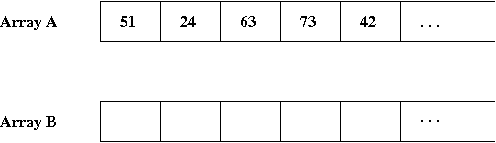
- We'll create a separate array that will contain the sorted elements.
- To create the sorted array, we go through the original and
copy over the current element "into the right place" in the sorted array.
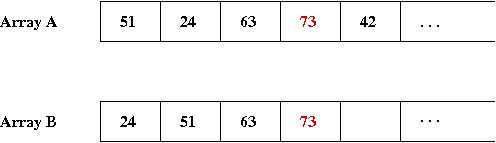
- For example, suppose array A is to be sorted:
- We'll created a sorted version in array B.
- Here are the first few elements when we start:
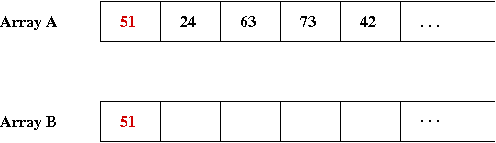
- The first element to insert in B is '51', which gets
into the first spot in B:
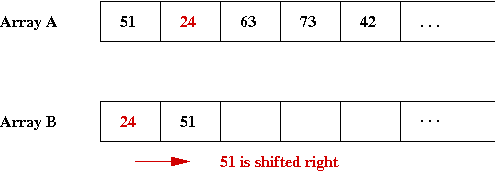
- Next element to insert is '24', for which we need to shift
'51' in the B array
=> We'll keep B sorted.
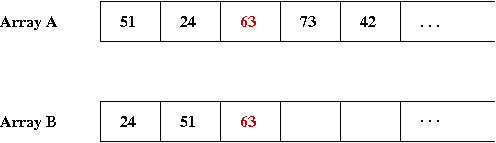
- Next element is '63', which goes into the 3rd spot:
- Then '73':
- Finally, for '42', we need to shift-right three elements to
find the right place for '42':
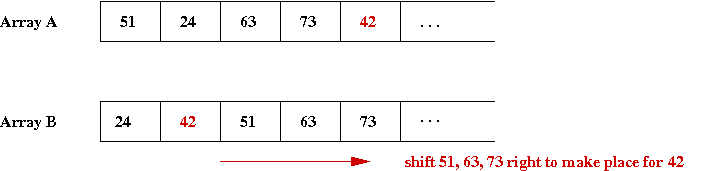
- Thus, the general idea is:
- Proceed sequentially through A's elements.
- For each, find the right place in B, shifting right
as necessary.
Here's the program:
(source file)
import java.util.*;

public class InsertionSort1 {

    public static void main (String[] argv)
    {
        int[] testData = {51, 24, 63, 73, 42, 85, 71, 41, 87, 32};

        System.out.println ("Before: " + Arrays.toString(testData));

	int[] sortedData = insertionSort (testData);

        System.out.println ("After: " + Arrays.toString(sortedData));
    }

    static int[] insertionSort (int[] A)
    {
        // Make space for the "result" array B:
        int[] B = new int [A.length];

        // Go through A's elements and find the right place for each in B:
	for (int i=0; i < A.length; i++) {

            // Find the right place for A[i] in array B.
            int posInB = i;
            for (int j=0; j < i; j++) {
                if (B[j] < A[i]) {
                    // Skip.
                }
                else {
                    posInB = j;
                    break;
                }
            }

            // Now shift rightwards in B from posInB onwards.
            for (int j=i+1; j>posInB; j--) {
                // We need this because the array has to be shifted except
                // for the last position when i=n-1.
                if (j < B.length) {
                    B[j] = B[j-1];
                }
            }

            // Assign A[i] in right place.
            B[posInB] = A[i];
	}

        return B;
    }

    static int[] makeRandomArray (int length)
    {
        // ...
    }

}
Note:
- To find the right place in B:
- We start at the right end of B (the most recent
index is i.
- We scan backwards, going past all elements that are larger
than A[i].
- When we find the right place:
- We shift-right all elements we skipped over.
- Then we insert A[i].
Now for the first clever insight:
- When we scan backwards in B, we can combine that
with shifting right
=>
This is because we the elements we skip over need to be shifted right.
Let's re-write insertionSort() to do that:
(source file)
    static int[] insertionSort (int[] A)
    {
        int[] B = new int [A.length];

	for (int i=0; i < A.length; i++) {

            B[i] = A[i];

            // Start at rightmost element in B.
            int j = i;

            // Swap as we go backwards.
            while ( (j > 0) && (B[j] < B[j-1]) ) {
                int temp = B[j];
                B[j] = B[j-1];
                B[j-1] = temp;
                j --;            // Mustn't forget the decrement.
            }

	}

        return B;
    }
Now the really clever insight:
- We don't need a separate array at all!
- After all, those elements we are skipping/swapping are precisely
those "to the left" in B
=>
But these are the same "to-the-left" elements in A!
Here's a re-write of insertionSort() using only array A:
(source file)
    static void insertionSort (int[] A)
    {
	for (int i=0; i < A.length; i++) {

            // Find the right place for A[i].
            int j = i;

            while ( (j > 0) && (A[j] < A[j-1]) ) {
                // Swap until we stop.
                int temp = A[j];
                A[j] = A[j-1];
                A[j-1] = temp;
                j --;
            }

	}
    }
Finally, we point out that a for-loop could be used instead
of the while-loop:
(source file)
    static void insertionSort (int[] A)
    {
	for (int i=0; i < A.length; i++) {

            for (int j=i; (j>0) && (A[j] < A[j-1]); j--) {
                int temp = A[j];
                A[j] = A[j-1];
                A[j-1] = temp;
            }

	}
    }
Sorting our own objects
Let's look at an example where we create objects of our own design and
sort them:
Here's the program:
(source file)
class Person {

    // Some data:
    String firstName;
    String lastName;
    int birthYear;


    // This is called a constructor:

    public Person (String firstName, String lastName, int birthYear)
    {
        this.firstName = firstName;
        this.lastName = lastName;
        this.birthYear = birthYear;
    }


    // A comparison method to allow two Person instances to be compared.

    public boolean lessThan (Person p)
    {
        // Compare the birthyear inside this instance (where we are executing)
        // with the birthyear of the parameter instance.
        if (birthYear < p.birthYear) {
            return true;
        }
        else {
            return false;
        }
    }

} // end-of-Person


public class ObjectSortExample {

    public static void main (String[] argv)
    {
        // Make space for 10 person pointers.
        Person[] someKennedys = new Person [10];

        // Each array location is itself an object pointer. We
        // need to assign actual object instances using the new operator.
        someKennedys[0] = new Person ("Patrick", "Kennedy", 1858);
        someKennedys[1] = new Person ("Joseph", "Kennedy", 1888);
        someKennedys[2] = new Person ("Rose", "Fitzgerald", 1890);
        someKennedys[3] = new Person ("Joseph", "Kennedy", 1915);
        someKennedys[4] = new Person ("John", "Kennedy", 1917);
        someKennedys[5] = new Person ("Jacqueline", "Bouvier", 1929);
        someKennedys[6] = new Person ("Robert", "Kennedy", 1925);
        someKennedys[7] = new Person ("Edward", "Kennedy", 1932);
        someKennedys[8] = new Person ("Caroline", "Kennedy", 1957);
        someKennedys[9] = new Person ("Maria", "Shriver", 1955);

        System.out.println ("Unsorted: ");
        print (someKennedys);

        sort (someKennedys);

        System.out.println ("\nSorted: ");
        print (someKennedys);
    }


    static void print (Person[] people)
    {
        for (int i=0; i < people.length; i++) {
            System.out.println (people[i].firstName + " " + people[i].lastName + " (b. " + people[i].birthYear + ")");
        }
    }


    static void sort (Person[] people)
    {
        // Selection Sort.

	for (int i=0; i < people.length-1; i++) {
	    Person min = people[i];
	    int pos = i;
	    for (int j=i+1; j < people.length; j++) {
                // Compare j-th person with best so far.
		if ( people[j].lessThan (min) ) {
		    min = people[j];
		    pos = j;
		}
	    }

	    // Swap.
	    Person temp = people[i];
	    people[i] = people[pos];
	    people[pos] = temp;
	}
    }

} // end-of-ObjectSortExample
Note:
- In the int version of Selection-Sort, the key
comparison occured in the for-loop:
	    for (int j=i+1; j < A.length; j++) {
		if (A[j] < smallest) {
		    smallest = A[j];
		    pos = j;
		}
	    }
Here, A[i] (an int) is compared to
smallest (also an int).
- In the Person example,
	    for (int j=i+1; j < people.length; j++) {
		if ( people[j].lessThan (min) ) {
		    min = people[j];
		    pos = j;
		}
	    }
Here, people[j] (a Person instance) is
compared to min (also a Person instance).
- The comparison itself is done inside the method
lessThan() in one instance.
Quicksort
Key ideas in Quicksort:
- Consider the array
[51, 24, 63, 73, 42, 85, 71, 41, 87, 32]
and the first element '51'.
- Suppose we place the elements less than '51' to the left
and those greater to the right of it:
[24, 42, 41, 32] 51 [63, 73, 85, 71, 87]
- Then, suppose we magically sort the left array independently:
[24, 32, 41, 42] 51 [63, 73, 85, 71, 87]
- Next, suppose we magically sort the right array:
[24, 32, 41, 42] 51 [63, 71, 73, 85, 87]
- Then, we can piece together the final result:
[24, 32, 41, 42, 51, 63, 71, 73, 85, 87]
- Key insight: sorting the smaller arrays (left and right)
is just like sorting a larger array
=>
We can apply the same idea recursively.
- Thus, the code is going to look like this:
    static void quickSortRecursive (int[] data, int left, int right)
    {
        if (left < right) {

            // Partition to find the "right place" for the leftmost element.
            int partitionPosition = quickSortPartition (data, left, right);

            // Recurse on the left side:
            quickSortRecursive (data, left, partitionPosition-1);

            // Recurse on the right side:
            quickSortRecursive (data, partitionPosition+1, right);
        }
        // Else: left==right so we're done.
    }
- We won't need to build separate arrays if we can somehow
do everything in one array:
- When we "partition" the array, we use the leftmost element
and find the "right place" for it:
        [24, 42, 41, 32, 51, 63, 73, 85, 71, 87]        // Inside original array
                         ^
                      partition position = 4
- Then, all we need are the limits on each side:
        [24, 42, 41, 32, 51, 63, 73, 85, 71, 87]        // Inside original array
         ^           ^                                  // Left array limits
        left=0       right=3
and
        [24, 42, 41, 32, 51, 63, 73, 85, 71, 87]        // Inside original array
                             ^                ^         // Right array limits
                             left=6         right=9
- Thus, if we can write the recursive method to work with "left"
and "right" indices to delineate a portion of the array, we can use
the same array.
Here's the program:
(source file)
import java.util.*;

public class QuickSort {

    public static void main (String[] argv)
    {
        int[] testData = {51, 24, 63, 73, 42, 85, 71, 41, 87, 32};

        System.out.println ("Before: " + Arrays.toString(testData));

	quickSort (testData);

        System.out.println ("After: " + Arrays.toString(testData));
    }


    static void quickSort (int[] A)
    {
        quickSortRecursive (A, 0, A.length-1);
    }


    static void quickSortRecursive (int[] data, int left, int right)
    {
        if (left < right) {

            // Partition to find the "right place" for the leftmost element.
            int partitionPosition = quickSortPartition (data, left, right);

            // Recurse on the left side:
            quickSortRecursive (data, left, partitionPosition-1);

            // Recurse on the right side:
            quickSortRecursive (data, partitionPosition+1, right);
        }
        // Else: left==right so we're done.
    }


    static int quickSortPartition (int[] data, int left, int right)
    {
        if (left == right)
            return left;
        int partitionElement = data[right];
        int currentSwapPosition = right;
        for (int i=right-1; i>=left; i--) {
            // Examine everything between left and right-1 inclusive.
            if (data[i] > partitionElement) {
                // Switch with swap position
                currentSwapPosition--;
                swap (data, currentSwapPosition, i);
                // Shift swap position rightwards:
            }
        }
        // Last one:
        swap (data, currentSwapPosition, right);
        return currentSwapPosition;
    }


    static void swap (int[] data, int i, int j)
    {
        int temp = data[i];
        data[i] = data[j];
        data[j] = temp;
    }

}
Measuring actual run time
In Java, it is fairly easy to measure actual running time, accurate
to within milliseconds, for example:
        // Get the current time (in milliseconds).
        long startTime = System.currentTimeMillis ();

        // Here's the code we're going to evaluate.
        selectionSort (A);

        // After it has run, we record the time taken as the current
        // time minus the starttime.
        long timeTaken = System.currentTimeMillis () - startTime;

        System.out.println ("Selection sort time: " + timeTaken);