As usual, in each such assignment set, we will help develop your
problem-solving skills by showing you how to solve one
problem, the first and often hardest problem.
However, the solution will include some exercises
for you that you will need to submit.
Assignment problems
Demo problem.
Consider a number like 14. We're going to iteratively divide by 2
using integer division as follows:
14 // 2 = 7
7 // 2 = 3
3 // 2 = 1
Here, it took three successive "divides" by 2 for 14 to reach 1.
In your
assignment2.pdf,
work through how many divides it takes for 1000.
For the programming part, we will prompt the user for
an integer and count the number of divides (when dividing by 2).
In fact, we will
keep prompting the user for integers, computing and reporting
the number of divides for each, until the user decides "enough".
When the user types a negative number to indicate "enough"
we stop prompting. Here is sample output:
Enter an integer: 14
Number of divides for n=14: 3
Enter an integer: 64
Number of divides for n=64: 6
Enter an integer: 33
Number of divides for n=33: 5
Enter an integer: -1
Thank you!
Here, the user first entered 14 (resulting in 3 divides),
then entered 64 (resulting in 6 divides), then 33 (resulting in 5
divides), -1 to stop.
There are two while-loops at work, one in iterating over
user input, and the other in iterative divides.
At this point, do not read further and try to
write down pseudocode to solve the problem.
Don't forget to submit your solutions to the exercises within.
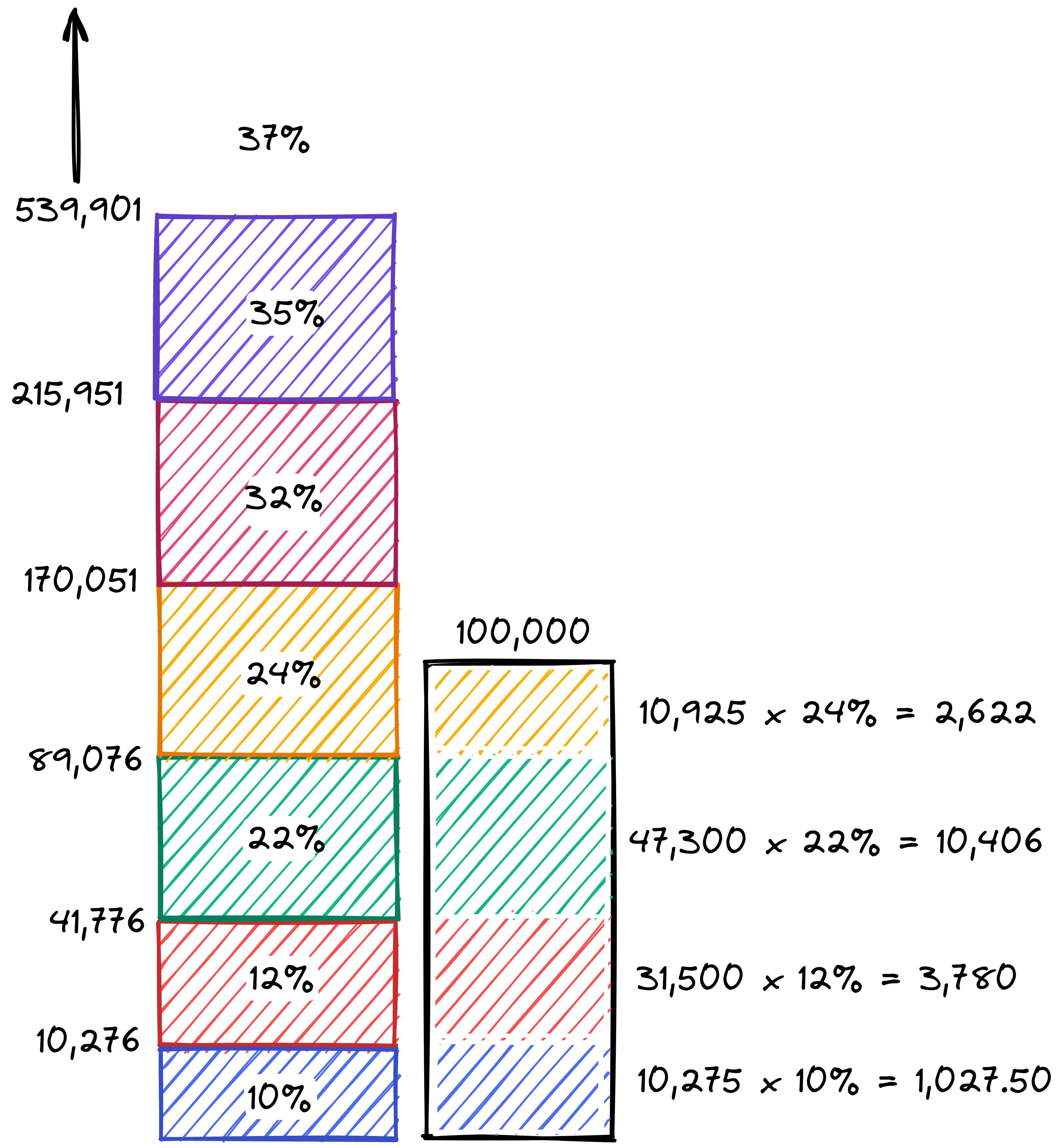
The United States tax system will use the following tax table in tax year 2022 for a single-person household (IRS):
income level $
tax rate %
at or above 539,901
37
215,951
35
170,051
32
89,076
24
41,776
22
10,276
12
default
10
The United States Federal Income Tax is a "progressive" system of taxation. People sometimes misunderstand the tax bracket system and think that earning more money can cause someone to take home less (after taxes) because of moving to a higher tax bracket. This is not the case: the tax bracket system works by taxing the fraction of income in each bracket at that bracket's rate. Someone who earns more money only pays the higer rate on the extra income.
For example, someone who has a taxable income $40,000 falls into the 12% tax bracket. That does not mean that his entire income is taxed at 12%!
The first $10,275 is taxed at 10%. $10,275 x 10% = $1,027.50
The next $29,725 (the amount greater than or equal to $10,276)is taxed at 12%. $29,725 x 10% = $3,447
The total tax is $3,447 + $1,027.50 = $4474.50
Dividing $4474.50 by the income of $40,000 yields an effective tax rate of 11.19%. This makes intuitive sense: some of the income is in the 10% bracket, and some is in the 12% bracket, so the effective tax rate ends up being in between 10% and 12%.
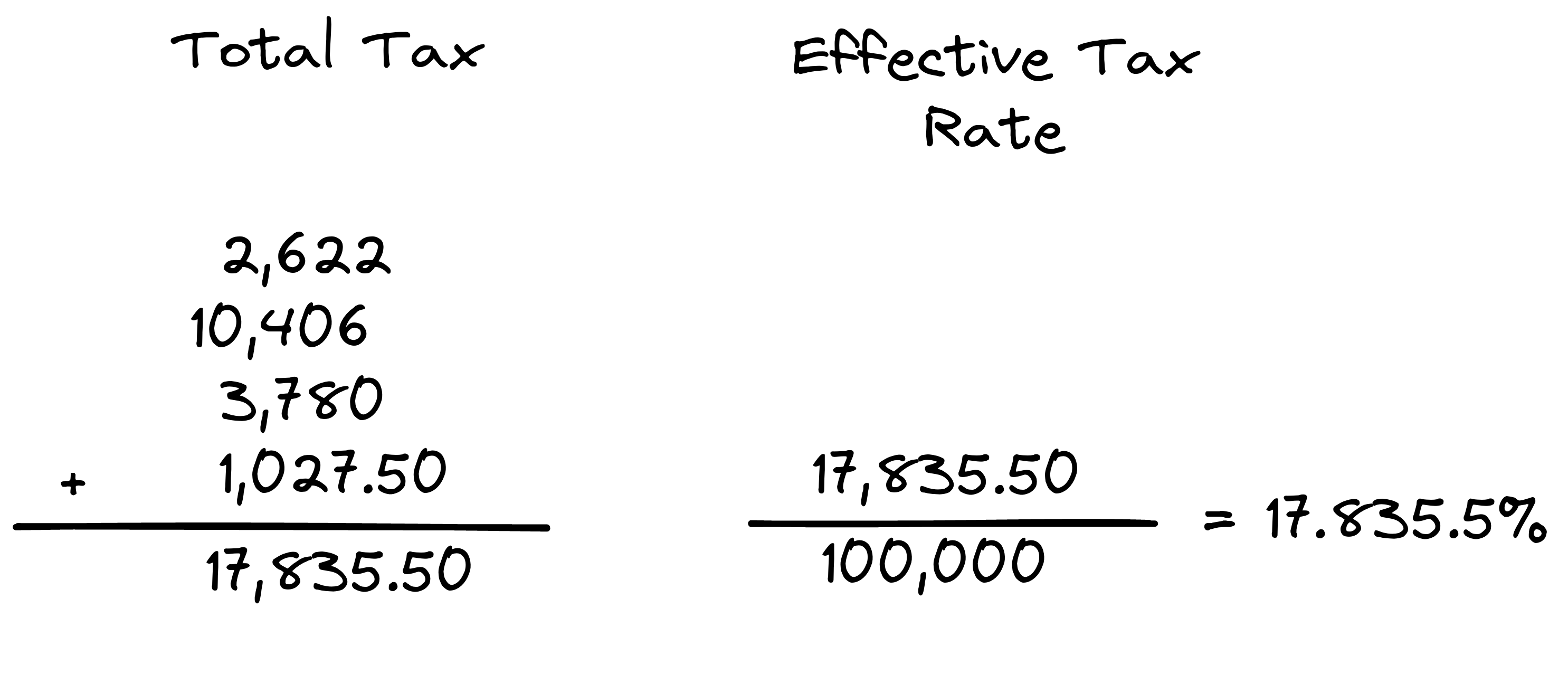
Here is another example, shown graphically, for someone with a taxable income of $100,000:
You are encouraged to work through the calculations by hand to understand how the system works.
You will write a program that given the income and the tax bracket table, computes the total tax and effective tax rate according to the 2022 US Federal progressive tax rate.
Your report_tax_data function must print, in a space separated format, the following values in column format: the total tax in dollars, the top bracket rate applied in percentage, the effective tax rate in percentage, the original income, and the effective income after taxes. Here is what your output for the above program should look like:
Note that this output shows some error in the calculation due to floating point approximation which will be fine if the margin of error is very small.
For example, 6616.879999999999 in the second row will be compared to and considered equal to 6616.88. As long as rounding to two decimal places approximates the correct answer, your answer will be considered correct.
Write your code in
tax_calculations.py.
We've used wordtool before to loop through nouns and verbs.
For example, let's print the first 10 nouns:
words = wordtool.get_nouns()
for i in range(10):
    print(words[i])
Consider the following:
import wordtool

def has_all_characters(word, chlist):

      # Write code so that this function
      # returns True if the word contains
      # all characters in the character list
      # otherwise returns false

def find_word_containing(words, chlist):
    position = -1


      # Write a while loop here to find the
      # last word (alphabetically) that contains
      # all of the characters in the character list
      # and set the variable `position` to its index
      # otherwise, do not change `position`` from -1


    # This branch prints the result in expected format
    if position >= 0:
        print('Found', words[position], 'at position', position, 'containing', ', '.join(chlist))
    else:
        print('Did not find a word containing', ', '.join(chlist))

words = wordtool.get_nouns()

find_word_containing(words, ['a','e','i','o','u'])
find_word_containing(words, ['a','s','d','f','g'])
find_word_containing(words, ['q','w','e','r','t'])
find_word_containing(words, ['l','m','n','o','p'])
find_word_containing(words, ['a','d','z','e'])
Your program should produce the following output when executed:
Found tambourine at position 9489 containing a, e, i, o, u
Found safeguard at position 8177 containing a, s, d, f, g
Did not find a word containing q, w, e, r, t
Found proclamation at position 7455 containing l, m, n, o, p
Found dazzle at position 2615 containing a, d, z, e
Note that the output formatting is provided in the branch at the end of the find_word_containing function and this branch is driven by whether or not the variable position is non-negative. If position is non-negative once the branch is reached, the word is assumed to be found at the index defined by position in the list of words; however, if position is negative, that is the indicator to the branch that no word was found from the list of words that contains the characters in chlist.
You must use a while loop in the find_word_containing function and this function must use the has_all_characters function in its process to determine whether a given word contains all the characters from chlist.
Write your code in
words_with_certain_characters.py.
This next problem is about processing data from text files.
To start, download
drawtool.py
and
circles.py,
and then read through the latter.
Then download these four files:
circles0.txt,
circles1.txt,
circles2.txt,
circles3.txt,
as well. Examine the data files to see that each line
except the first
has data about a single circle: the x,y coordinates
of the origin, and the radius.
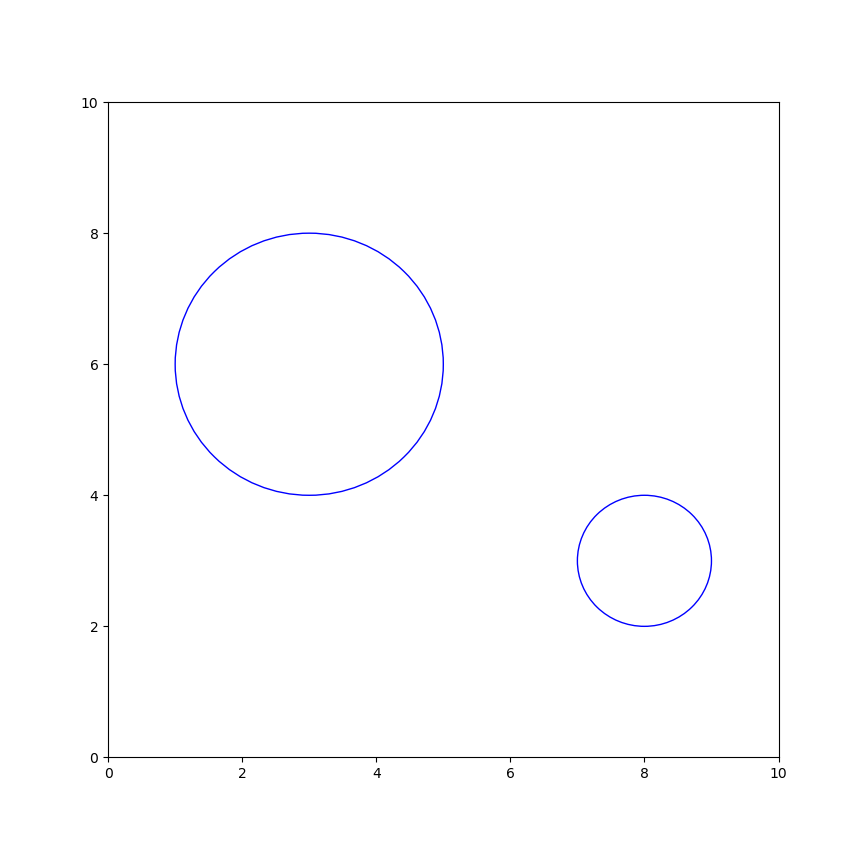
For example, the first file is:
  2
  3 6 2
  8 3 1
This indicates 2 circles.
One with origin at (3, 6) and radius 2.
One with origin at (8, 3) and radius 1.
Now run the
circles.py
program. Then, in the program, change
circles0.txt
to
circles1.txt.
and then to
circles2.txt.
And once again to
circles3.txt.
You can then look at the files and confirm that you are
indeed seeing the circles in those files. You should also
see some circles overlap with others, while some circles
are entirely isolated.
Now for the assignment. Your goal is to identify which
circles overlap another, and to draw them in red.
You'll see that all you have to write is the code that
determines the overlaps.
Note: use while loops instead of for loops in your part of the code.
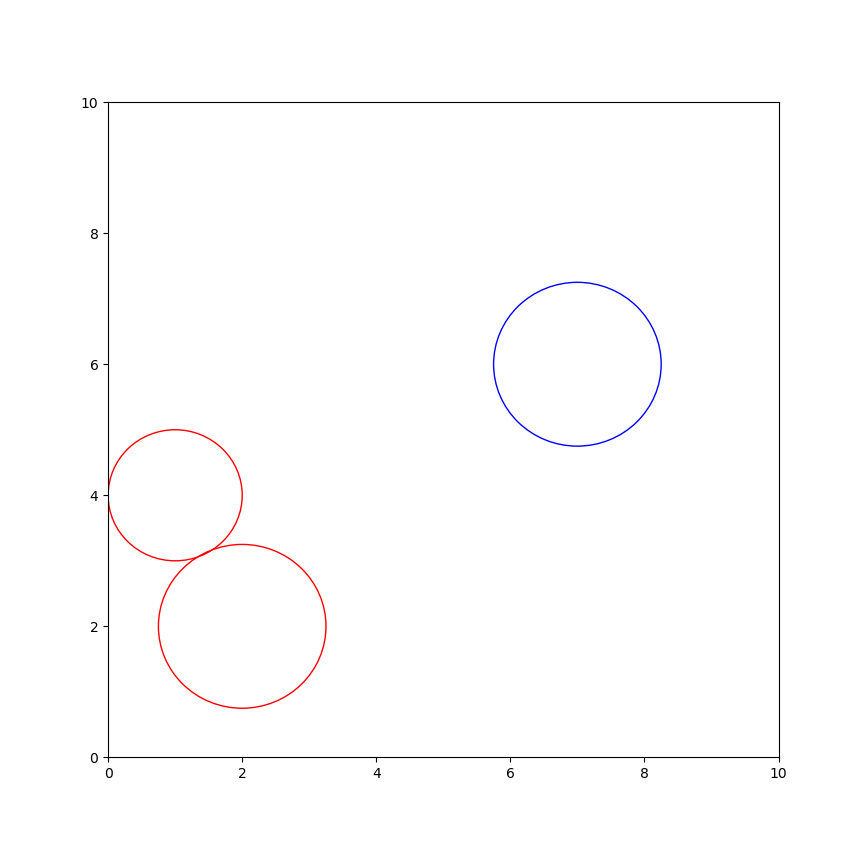
When you use the circles0.txt, you should see:
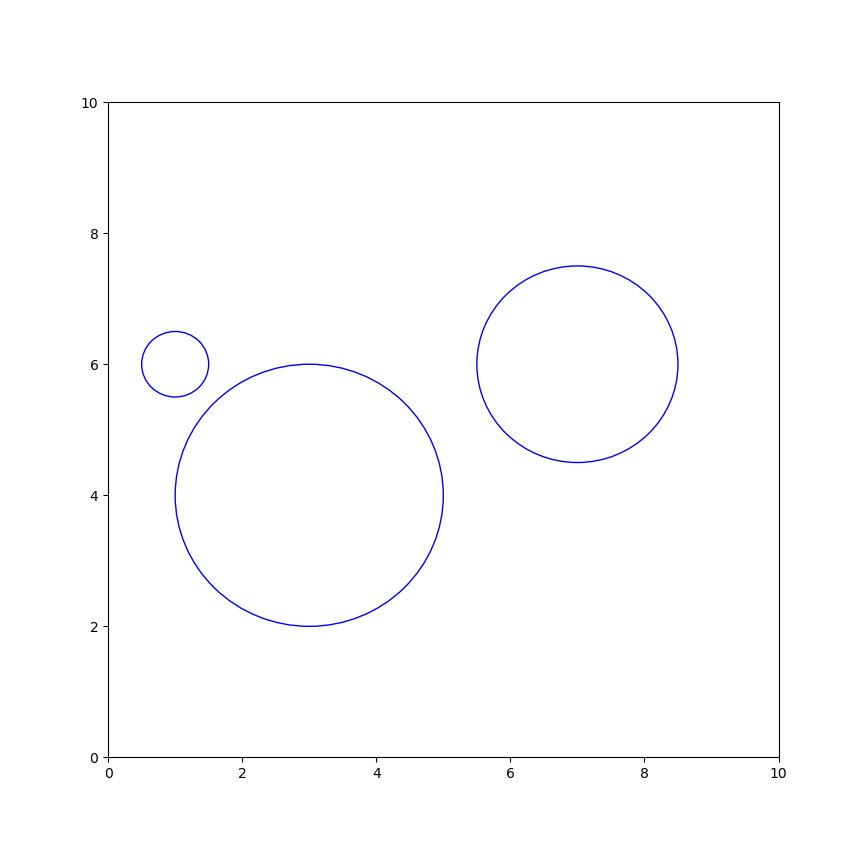
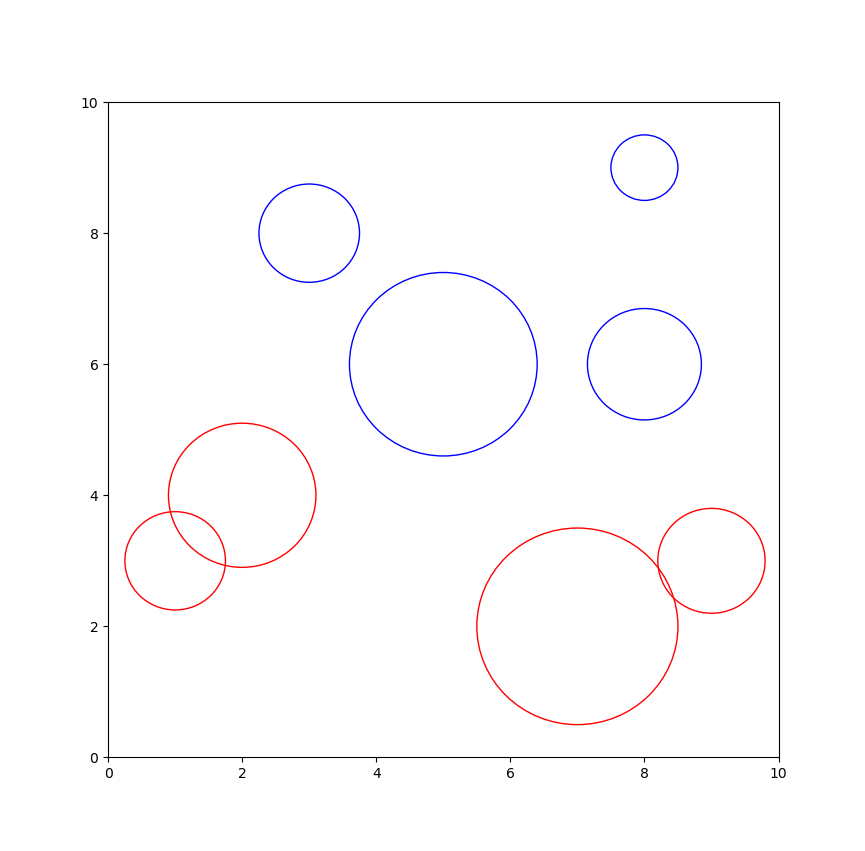
With circles1.txt, you should see:
With circles2.txt, you should see:
With circles3.txt, you should see:
Submit your solution including all files necessary to run the program. In your version of circles.py make sure that your submitted program is loading circles3.txt.
Identify five lines of work that involve computer programming, other than simply "computer programmer."
Write 1-2 sentences describing each job and how computing fits into the role, such that they're clearly distinguished from each other. Include this in your assignment2.pdf submission.
A2.6 Audio:
How to submit:
Write all your programs and assignment2.pdf
in a directory called assignment2.