As usual, in each such assignment set, we will help develop your
problem-solving skills by showing you how to solve one
problem, the first and often hardest problem.
However, the solution will include some exercises
for you that you will need to submit.
Assignment problems
Demo problem.
Consider this
coding puzzle. Suppose we're asked to print out lines in a pattern like this:
z
zy
zyx
zyxw
zyxwv
zyxwvu
zyxwvut
zyxwvuts
zyxwvutsr
zyxwvutsrq
And suppose we want to use for-loops to achieve this. How do we go
about solving this problem?
At this point, do not read further and try to address the following:
First understand what is being asked.
Do see a for-loop or two at work where, as the loops are
printing, you'll get the output shown above?
Can the problem be broken down into parts, where you can solve
the parts and put the solution together afterwards?
Try writing some code to get at least some of the output.
Don't forget to submit your solutions to the exercises within.
Write a program called computations.py that performs the operations detailed below
# Given m and n
m = 5
n = 2

# Assume m is greater than n
#
# Write code to...
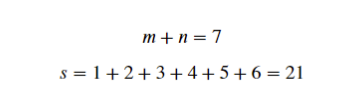
#   In variable s, add up all of the positive integers less than m+n
#   For the example of m = 5 and n = 2, the mathematical expression is:
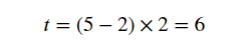
#   In variable t, subtract n from m, then multiply that result by n
#   For the example of m = 5 and n = 2, the mathematical expression is:
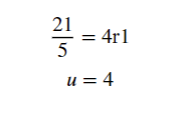
#   In the variable u, store the integer quotient from dividing s by m
#   For the example of m = 5 and n = 2, recall that s = 21, and the mathematical expression is:
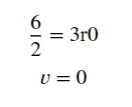
#   In the variable v, store the integer remainder from dividing t by n
#   For the example of m = 5 and n = 2, recall that t = 6, and the mathematical expression is:
# print(s, t, u, v) at the end of the program
#
# When m=5 and n=2, your program should print:
# 21 6 4 0
Test your code with the values of m and n above. Once the program produces the expected output, run the program again with the following values of m and n, filling in the table below with the outputs of each run. Include the filled table in your pdf. Before submitting your code, change m and n back to their default values of m=5 and n=2.
m
n
print(s, t, u, v)
5
2
21 6 4 0
8
3
21
5
18
15
Review the random sentence generator from Exercise 5.7. In sentence_statistics.py, you will write code using a loop to generate and print an arbitrary number `n` sentences with structure:
You will need to generate two random nouns, one random adjective, and one random verb for each sentence.
Your program should compute the average character length of the sentences generated. Each time you generate a sentence, calculate the sentence's length and add that value to a running total. When you have finished generating all of the sentences, divide the running total by the number of sentences (`n`) to get the average.
For example, a sentence with the structure below has an average length of approximately 17 characters when run with 100 random sentences.
sentence = ("A " + noun + " " + verb + "s.")
Run your program ten times with a value of n = 1 and record the average sentence length of each run in your pdf.
Run your program ten times with a value of n = 10 and record the average sentence length of each run in your pdf.
Run your program ten times with a value of n = 100 and record the average sentence length of each run in your pdf.
Explain what you observe about the consistency of the results as the number of sentences n rises. In other words, why does the average for the number of characters in a sentence become more consistent as the number of random samples n used in the experiment rises?
Make sure your program is submitted with n = 100.
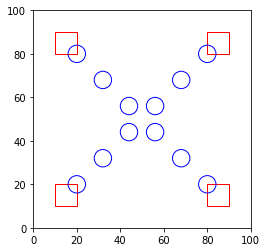
In circles_and_squares.py, write code to use drawtool to generate:
Use this sample code to get started:
from drawtool import DrawTool

dt = DrawTool()

dt.set_XY_range(0, 100, 0, 100)
dt.set_aspect('equal')
dt.pixels = 500
# WRITE YOUR CODE BETWEEN HERE

dt.set_color('r')
dt.draw_rectangle(10, 10, 10, 10)


dt.set_color('b')
i = 20
for j in range(20, 60, 12):
    dt.draw_circle(i, j, 4)
    i += 12


# AND HERE
dt.display()
Start by downloading drawtool.py into your assignment folder, then write the above code in `circles_and_squares.py`, which generates part of the final drawing. Run it to see how the example works, then write code to produce the final image.
Art project.
In
my_geometric_art2.py,
use the ability to draw rectangles and circles, changing colors
where needed, to make a far more impressive work of art.
You are also welcome to use other functions in drawtool such as:
Note that you can control the color of pen in the drawtool using the following command:
dt.set_color('b')
The character 'b' in the above example instructs the drawtool to draw any shapes following the set_color command in blue up unitl the pen color is changed to another color. The following table illustrates the immediately available colors and its associated character:
'b'
blue
'g'
green
'r'
red
'c'
cyan
'm'
magenta
'y'
yellow
'k'
black
'w'
white
With a limited color and geometric palette, we're confident you
can make something Mark Rothko or Piet Mondrian would be proud of.
The following program intends to print the integer value of a letter (character) along with the corresponding letter, separately for uppercase first, and then lowercase. The output is something like this:
65 A
66 B
67 C
...
90 Z
97 a
98 b
99 c
122 z
Here's the program with errors:
s = ""
for i in range (66, 66+24):
    s = s + i + "" + chr(i) + "\n"

t = ""
for j in range(ord('a')), ord('z')+1):
    num = str(i)
    ch = chr(j)
    t += num + " " + ch + "\n"

print(s + t)
Identify and report each of the errors in this program in your assignment pdf. When identifying errors, include which line number they are on (the first line of the above is Line 1), what the error is, and why the error needs to be corrected.
Fix the errors and submit this program as alphabet_generator.py.
The following program intends to create a string a with value "23" and string b with value "89" and then sum the two integer values in the strings into string c with value "112". It should then print the three values, with output:
23 89 112
The below code contains several errors.
a = ""
for i in range(50,52):
    a += i

for i in range(56,58)
    b += chr(j)

print(a, b, a + b)
Correct the errors in string_summation.py. Identify and report each of the errors in this program in your assignment pdf. When identifying errors, include which line number they are on (the first line of the above is Line 1), what the error is, and why the error needs to be corrected.
In
assignment2.pdf,
explore geometric art and the general topic of computer-generated art.
What were you able to find? Write a paragraph on a well-known
artist and provide a link to the sources you found. Explain what
you like in this artist's work and why.
A2.3 Audio:
How to submit:
Write all your programs and assignment2.pdf
in a directory called assignment2.