Objectives and example
Assignments are designed to strengthen your problem-solving skills and build independence. While the module exercises are small variations of explained module examples, a single assignment will have multiple problems, all of which are intended to be more challenging than the module exercises, and will feature less detailed guidance. This is a good thing because, ultimately, you'll have to solve problems on your own. Facing and overcoming challenging problems cheerfully is the key to building problem-solving skill.
In each such assignment set, we will help develop your problem-solving skills by showing you how to solve one problem, the first and often hardest problem. However, the solution will include some exercises for you that you will need to submit.
Don't forget to submit your solutions to the exercises within.
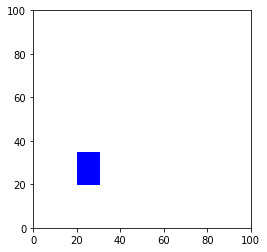
The code for drawing a single rectangle is:
As a first step, download
drawtool.py
into your assignment1 folder and type up the above single-rectangle
example in
my_filled_rectangle_example.py.
This way, you know that the download worked and that drawing works.
Note the comment describing the draw_filled_rectangle function. The function takes four arguments: the first two arguments specify the x and y coordinates of the lower left corner of the rectangle, the second two arguments specify the rectangle's width and height.
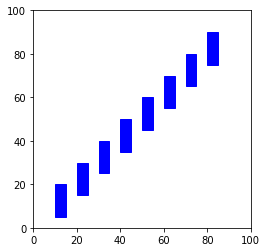
Now, in my_rectangle_plot.py, write code to display the plot with multiple rectangles. Your solution must use a for loop to draw the multiple rectangles, so think about how you will loop over a range of values and how long that range of values needs to be.
Write your program in
my_rectangle_plot.py.
A1.6 Audio:
Assignment problems
*
**
***
****
*****
******
*******
********
*********
**********
**********
*********
********
*******
******
*****
****
***
**
*
At this point, do not read further and try to address the following:
01234
12345
23456
34567
45678
56789
******
*    *
*    *
*    *
*    *
******
You will turn in your program such that when run it prints the above pattern; however, you must design your program such that it has one variable at the beginning that determines the size of the box where size is the number of stars on the first line and the overall number or rows. For example, the first line of your program may read:
size = 6
Your program must generate the box based on whatever integer value is assigned to this variable. For example, setting this variable to size = 8
would print the following box:
********
*      *
*      *
*      *
*      *
*      *
*      *
********
Remember, the program you turn in must have this variable set to a value of size = 6
and generate a box of size 6.
from drawtool import DrawTool

dt = DrawTool()
dt.set_XY_range(0,100, 0,100)
dt.set_aspect(1)

# dt.draw_filled_rectangle(lower_left_x, lower_left_y, width, height)
dt.draw_filled_rectangle(20, 20, 10, 15)

dt.display()
Running that code should display the following image:
"The best conversations are with yourself. At least there's no risk of a misunderstanding." - Olga Tokarczuk
"...we have to keep reminding ourselves, over and over: "This is water, this is water."" - David Foster Wallace
"Time solves most things. And what time can't solve, you have to solve yourself." - Haruki Murakami
This is the draft program. It contains several errors...
print("The best conversations are with yourself. At least there's no risk of a misunderstanding." - Olga Tokarczuk)
print("...we have to keep reminding ourselves, over and over: "This is water, this is water."" - David Foster Wallace)
print('Time solves most things. And what time can't solve, you have to solve yourself." - Haruki Murakami')
Identify the errors in your assignment pdf. Fix them in quotes.py.
Hello!
Hello!
Hello!
Hello!
Hello!
Hello!
This is the draft program. It contains several errors...
def print_hello_6()
    for i in range 6:
        print('Hello')

print(hello_6())
Identify the errors in your assignment pdf. Fix them in fixed_hello6.py.
Stand by...
5
4
3
2
1
Lift off!
This is the draft program. It contains several errors...
Def countdown
    for j in range(5)
        print(i)

print "Stand by..."
count down()
print("Lift off!')
Identify the errors in your assignment pdf. Fix them in fixed_liftoff.py.
How to submit: